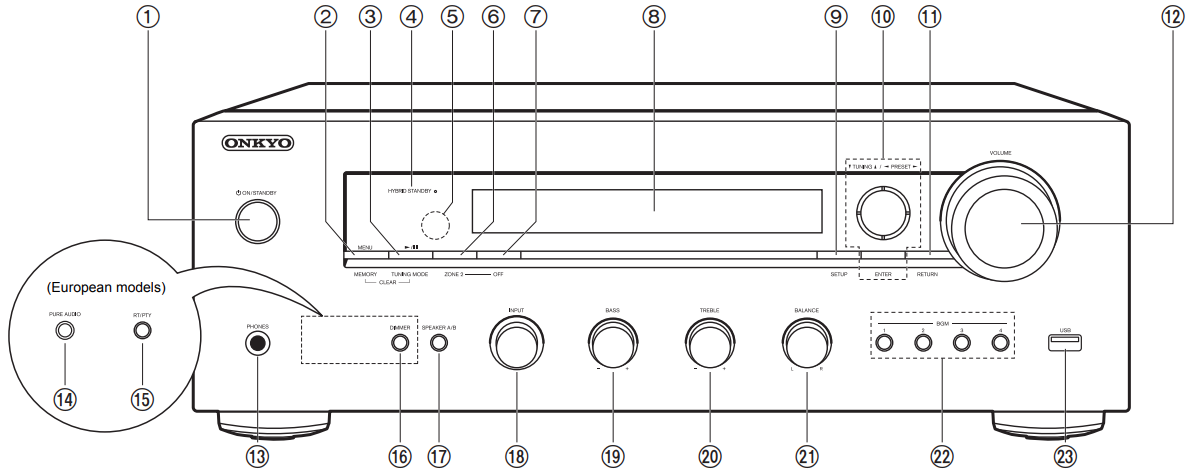
MENU button: Used to display the menu MEMORY button: Used to register DAB (European models)/AM (North American models)/FM radio stations
Play/Pause button: Used for play operations when playing Music Server or USB.
TUNING MODE button (North American models): Switches tuning to an AM/FM station between automatic tuning and manual tuning.
TUNING MODE button (European models): Switches tuning to an FM station between automatic tuning and manual tuning, and allows you to select the order for displaying DAB stations.
HYBRID STANDBY indicator: Lights if the unit enters standby mode when the features are enabled that continue to work when this unit is in standby, such as HDMI Standby Through and Network Standby.
Remote control sensor: Receives signals from the remote controller. The signal range of the remote controller is within about 16y/5 m, at an angle of 20° on the perpendicular axis and 30° to either side.
ZONE 2 button: Controls the multi-zone function
OFF button: Switches the multi-zone function off
Display
SETUP button: You can show advanced setting items on the TV and display to provide you with an even better experience
Cursors (D / C / B / A), ENTER button: Select the item with the cursors and press ENTER to confirm. Use them to tune to stations when using TUNER.
RETURN button: Returns the display to the previous state during setting
VOLUME
PHONES jack: Connect stereo headphones with a standard plug (Ø1/4z/6.3 mm diameter)
PURE AUDIO button/LED (European models): Turns on or off the Pure Audio mode which provides a purer sound and turns off the display and cuts off analog video circuits. The LED lights when it is on, the display turns off, and the "Bass" and "Treble" settings are disabled. Pure Audio mode cannot be selected when using the Multi-zone feature. Activating the Multi-zone feature while this mode is selected automatically switches the listening mode to Direct.
RT/PTY button (European models): Used when receiving stations transmitting text information.
DIMMER button (North American models): You can adjust the brightness of the display in three steps. It cannot be turned off completely.
SPEAKER A/B button: Select the terminals to output audio from between SPEAKERS A/B
INPUT dial: Switches the input to be played
BASS dial: Adjusts the bass
TREBLE dial: Adjusts the treble
BALANCE dial: Adjusts the balance of the sounds output from the left and right speakers
BGM 1/2/3/4 buttons: Preset your favorite internet radio or DAB (European models)/AM (North American models)/FM radio stations (P21, 27, 30)
USB jack: A USB storage device is connected so that music files stored in it can be played. You can also supply power (5 V/1 A) to USB devices with a USB cable.
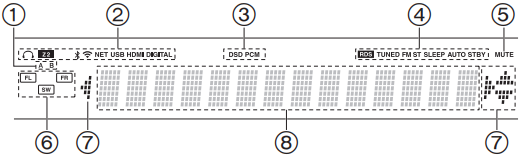
The currently selected speaker system lights.
Lights in the following conditions. Headphone Symbol: When headphones are connected Z2: ZONE 2 is on. Bluetooth Symbol: When connected via BLUETOOTH Wifi Symbol: When connected by Wi-Fi NET: When "NET" is selected with the input selector and the unit is connected to the network. It will flash if the connection to the network is not correct. USB: When "NET" is selected with the input selector and the unit is connected by USB and the USB device is selected. Flashes if the USB is not properly connected. HDMI: HDMI signals are input and the HDMI input selector is selected. DIGITAL: Digital signals are input and the digital input selector is selected. 3. Lights according to the type of input digital audio signals. 4. Lights in the following conditions. RDS (European models): Receiving RDS broadcasting. TUNED: Receiving DAB (European models)/AM (North American models)/FM radio FM ST: Receiving FM stereo. SLEEP: Sleep timer has been set. AUTO STBY: Auto Standby has been set. 5. Flashes when muting is on. 6. Speaker/Channel display: Displays the output channel of the speakers. 7. This may light when performing operations with the "NET" input selector. 8. Displays various information of the input signals.
Comments
0 comments
Article is closed for comments.