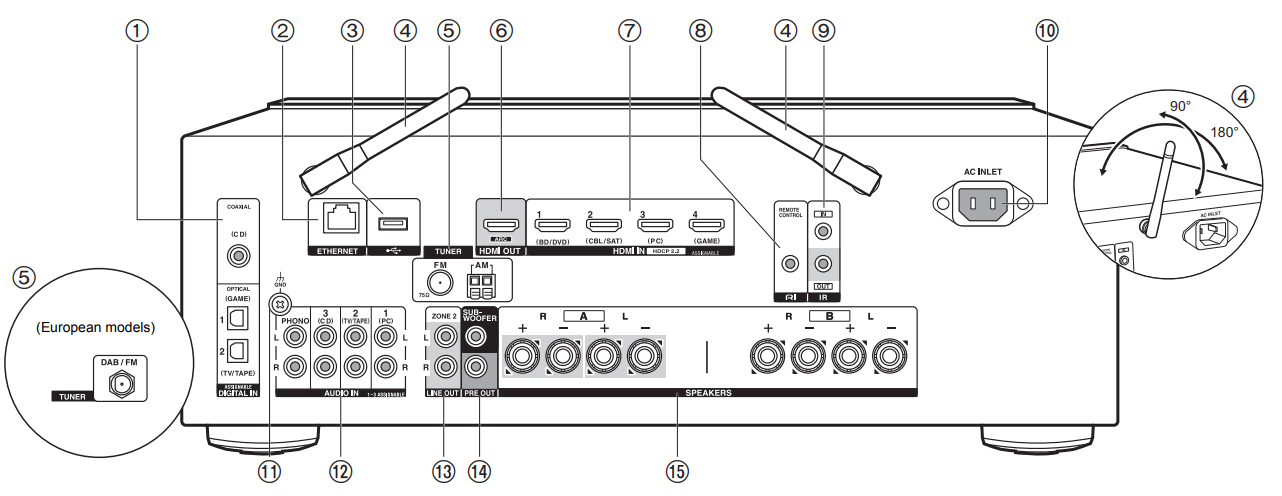
DIGITAL IN OPTICAL/COAXIAL jacks: Input TV or AV component digital audio signals with a digital optical cable or digital coaxial cable.
ETHERNET jack: Connect to the network with an Ethernet cable
USB jack: A USB storage device is connected so that music files stored in it can be played. You can also supply power (5 V/500 mA) to USB devices with a USB cable.
Wireless antenna: Raise for Wi-Fi connection or when using a BLUETOOTH wireless technology enabled device. Adjust their angles according to the connection status.
TUNER AM/FM 75ohm terminals (North American models): The supplied antennas are connected
HDMI OUT jack: Connect a HDMI cable to transfer video signals and audio signals to a TV
HDMI IN jacks: Input video signals and audio signals with a HDMI cable connected to an AV component.
REMOTE CONTROL jack: An Onkyo product with RI jack can be connected and synchronized with this unit
IR IN/OUT terminals: Connected to the multi-room remote control kit. Special devices or cables are necessary. For more information about preparation, contact the specialized stores.
AC INLET: Connect the supplied power cord
GND jack: The ground wire of the turntable is connected
AUDIO IN jacks: Input AV component audio signals with an analog audio cable. TUNER DAB/FM terminal (European models): The supplied antenna is connected.
ZONE 2 LINE OUT jacks: Output audio signals with an analog audio cable to a pre-main amplifier in a separate room (ZONE 2).
SUBWOOFER PRE OUT jacks: Connect a powered subwoofer with a subwoofer cable. Up to two powered subwoofers can be connected. The same signal is output from each of the SUBWOOFER PRE OUT jacks.
SPEAKERS jacks: Connect speakers with speaker cables. (North American models are banana plug ready.) You can connect a set of left and right speakers to each of the A/B terminals.
Comments
0 comments
Article is closed for comments.