TX-8270-Remote Control Layout
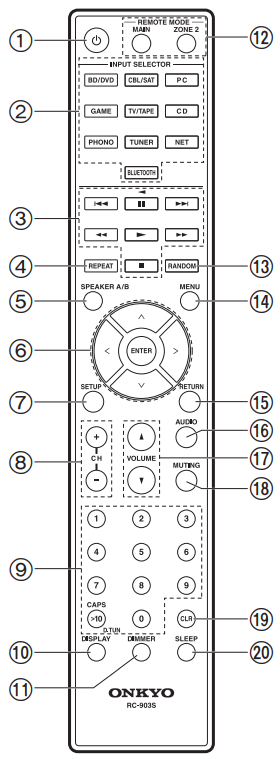
- Power ON/STANDBY button
- INPUT SELECTOR buttons: Switches the input to be played
- Play buttons: Used to control play of a Music Server or device connected via USB, or of RI connected devices.
- The <<,>>, and < buttons can only be used when playing RI connected devices
- REPEAT button: Used for repeat play operations when playing Music Server or USB. Each time you press the button, the mode switches from (1-track repeat) to (folder repeat).
- SPEAKER A/B button: Select the terminals to output audio from between SPEAKERS A/B.
- Cursors (D / C / B / A), ENTER button: Select the item with the cursors and press ENTER to confirm. When the folder or file lists are not shown on one screen on the TV, press B/A to change the screen.
- SETUP button: You can show advanced setting items on the TV and display to provide you with an even better experience
- CH (+/-) buttons: Used to select DAB (European models)/AM (North American models)/FM radio stations.
- Numbered buttons
- DISPLAY button: Switches the information on the display. You can display information such as the input source, volume, and input format when pressed repeatedly during play.
- DIMMER button: You can adjust the brightness of the display in three steps. It cannot be turned off completely.
- REMOTE MODE MAIN/ZONE 2 buttons: Controls the multi-zone function
- RANDOM button: Used for random play operations when playing Music Server or USB. Random turns on or off each time you press the button
- MENU button: Used to display the menu
- RETURN button: Returns the display to the previous state during setting
- AUDIO button: Settings such as "Tone" and "Level" can be made quickly during play on the TV screen
- VOLUME
- MUTING button: Temporarily mutes audio. Press again to cancel muting
- CLR button: Deletes all characters you have entered when entering text on the TV screen
- SLEEP button: Set the sleep timer
TIP
When the remote controller isn't working: The remote controller may have switched to the mode for controlling ZONE 2. Press REMOTE MODE MAIN to switch to the mode to control the main room.
Comments
0 comments
Article is closed for comments.