HT-S5910 - Front Panel and Display Layout
Front Panel

- POWER ON/STANDBY Button
- MUSIC OPTIMIZER Button: Turns on/off the MUSIC OPTIMIZER function that improves the quality of the compressed audio.
- BLUETOOTH Indicator: Lights up when this unit and a BLUETOOTH-enabled device are connected.
- DOLBY ATMOS Indicator: Lights up when Dolby Atmos signals are reproduced in appropriate listening mode.
- Remote Control Sensor: Receives signals from the remote controller.
The reception range of the remote controller is within a distance of approx.
16´/5 m, and an angle of 20° in vertical direction and 30° to right and left. - ZONE A/B Button: Selects an audio output destination from among "ZONE A", "ZONE B" and "ZONE A+B".
- INFO Button: Switches the information on the display.
- DIMMER Button: Switches the brightness of the display with three levels. It cannot be turned off completely.
- Display
- SETUP Button: You can display advanced setting items on the TV and the display to have a more enjoyable experience with this unit.
- Cursor buttons ( ^/v / </> ) and ENTER Button: Select an item with the cursors, and press ENTER to confirm your selection. When using TUNER, use them to tune in to stations.
- RETURN Button: Returns the display to the previous state while setting.
- MASTER VOLUME
- PHONES Jack: Connect headphones with a standard plug (ø1/4"/6.3 mm).
- LISTENING MODE Button: Switches the listening mode by pressing "STEREO", "MOVIE/TV" and "MUSIC" repeatedly.
- Input selector buttons: Switches the input to be played.
- TONE CONTROL Button: Adjusts the sound quality. Press </> of "TREBLE", "VOCAL" or "BASS" respectively.
-
SETUP MIC Jack: Connect the supplied speaker setup microphone.
Display
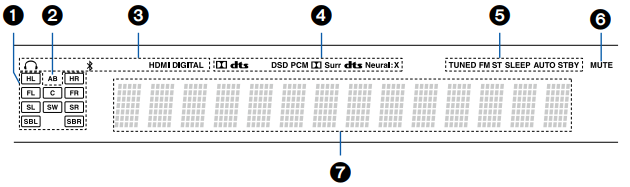
- Speaker/Channel Display: Displays the output channel that corresponds to the selected listening mode.
- Displays the audio output destination.
A: Outputs audio only to the main room (ZONE A).
B: Outputs audio only to the separate room (ZONE B).
AB: Outputs audio to both the main room (ZONE A) and separate room (ZONE B). - Lights in the following conditions.
 : Headphones are connected.
 : Connected by BLUETOOTH.
HDMI: HDMI signals are input and the HDMI input is selected.
DIGITAL: Digital signals are input and the digital input is selected. - Lights according to the type of input digital audio signal and the listening mode.
- Lights in the following conditions.
TUNED: Receiving AM/FM radio.
FM ST: Receiving FM stereo.
SLEEP: Sleep timer is set.
AUTO STBY: Auto Standby is set. - Blinks when muting is on.
- Displays various information of the input signals.
Comments
0 comments
Please sign in to leave a comment.