HT-S5910 - Remote Controller Layout
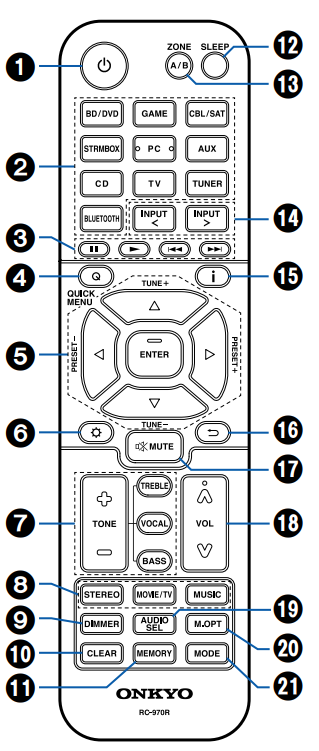
- POWER ON/STANDBY button
- Input selector buttons: Switches the input to be played.
- Play buttons: Used for playback operation of a BLUETOOTH-enabled device. If the unit is switched to "CEC MODE" using the MODE button, an HDMI CEC function-enabled AV component can be operated. (Depending on the device, operation may not be possible.)
- Q (QUICK MENU) button: Pressing this button during playback can make
settings such as "HDMI" and "Audio" quickly on the TV screen while playing. - Cursor buttons and ENTER button: Select an item with the cursors, and press ENTER to confirm your selection.
 button: Display advanced setting items on the TV or the display to have a more enjoyable experience with this unit.
- TONE button: Adjusts the sound quality.
- LISTENING MODE button: Select a listening mode.
- DIMMER button: Switches the brightness of the display with three levels. It cannot be turned off completely.
- CLEAR button: Deletes all characters you have entered when entering text on the TV screen.
- MEMORY button: Used to register AM/FM radio stations.
- SLEEP button: Set the sleep timer. Select the time from "30 min", "60 min" and "90 min".
- ZONE A/B button: Selects an audio output destination from among "ZONE A", "ZONE B" and "ZONE A+B".
- Input selector cursors: Switches the input to be played.
- "i" button: Switches the information on the display.
 button: Returns the display to the previous state while setting.
 button: Temporarily mutes audio. Press the button again to cancel muting.
- VOLUME buttons
- AUDIO SEL button: When a device is connected to two or more audio input terminals for one input selector, you can select which audio input signal to play.
- M.OPT button: Turns on/off the MUSIC OPTIMIZER function that improves the
quality of the compressed audio. - MODE button: Switches between automatic tuning and manual tuning for AM/FM stations. Also, when an HDMI CEC function-enabled AV component is connected to this unit, you can switch "3. Play buttons" between "CEC MODE" and "RCV MODE" (normal mode).
Comments
0 comments
Please sign in to leave a comment.