HT-S5910 - Connecting to a TV
ARC TV
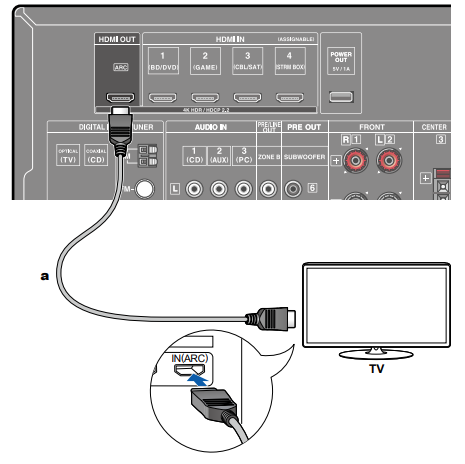
If the TV supports the ARC (Audio Return Channel) function (*), use only the HDMI cable to connect with the TV. Use the ARC-compatible HDMI IN jack of the TV for connection. You connect the HDMI cable to the port labeled OUT on the receiver side.
- If a 4K high-quality video is played, use a Premium High Speed HDMI Cable or Premium High Speed HDMI Cable with Ethernet whose package has a "PREMIUM Certified Cable" label. Furthermore, in "Switching the HDMI 4K Signal Format Input and Output by this Unit", change the setting value to "Enhanced".
Setup
- Settings are required to use the ARC function. Select "Yes" for "3. ARC Setup"
in Initial Setup. If "No, Skip" is selected, settings are required in the Setup menu after Initial Setup is completed. Press on the remote controller, and set "5. Hardware" - "HDMI" - "Audio Return Channel" to "On". - For detailed settings for TV connection, CEC function and audio output, refer to the instruction manual of the TV.
(*) ARC function: This function transmits the audio signals of the TV via an
HDMI cable, and plays the audio of the TV on this unit. Connection to an ARCcompatible TV is complete with one HDMI cable. To check if the TV supports the
ARC function, refer to the instruction manual of the TV, etc.
Non-ARC TV
If the TV does not support the ARC (Audio Return Channel) function (*), connect an HDMI cable and digital optical cable.
- If you use a cable set-top box, etc. connected to the input jack of this unit to watch TV (without using a TV’s built-in tuner), connection with a digital optical cable or analog audio cable is not required.
- If a 4K high-quality video is played, use a Premium High Speed HDMI Cable or Premium High Speed HDMI Cable with Ethernet whose package has a "PREMIUM Certified Cable" label. Furthermore, in "Switching the HDMI 4K Signal Format Input and Output by this Unit", change the setting value to "Enhanced".
(*) ARC function: This function transmits the audio signals of the TV via an HDMI cable, and plays the audio of the TV on this unit. Connection to an ARCcompatible TV is complete with one HDMI cable. To check if the TV supports the ARC function, refer to the instruction manual of the TV, etc.
Comments
0 comments
Please sign in to leave a comment.