HT-S5910 - Bluetooth Playback
You can wirelessly play the audio on a BLUETOOTH-enabled device, such as a smartphone.
Pairing
- When you press the BLUETOOTH button, "Now Pairing..." is displayed on this unit's display, and the pairing mode is enabled.
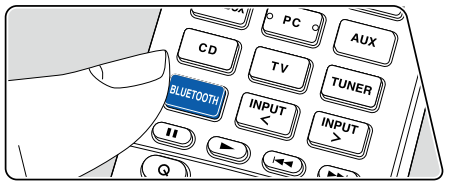

- Enable (turn on) the BLUETOOTH function of the BLUETOOTH-enabled device, and then select this unit from among the devices displayed. If a password is requested, enter "0000".
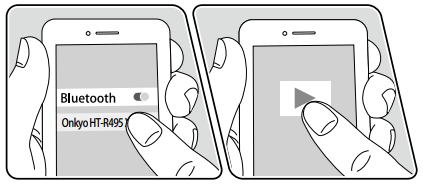
- This unit is displayed as "Onkyo HT-R495 XXXXXX".
- To connect another BLUETOOTH-enabled device, press and hold the BLUETOOTH button until "Now Pairing..." is displayed, and then perform step 2. This unit can store the pairing information of up to 8 paired devices.
- The coverage area is approx. 48´/15 m. Note that connection is not always guaranteed with all BLUETOOTH-enabled devices.
Playing Back
- Perform the connection procedure on the BLUETOOTH-enabled device.
- Playing the music file.
The input on this unit automatically switches to "BLUETOOTH".
Turn up the volume of the BLUETOOTH-enabled device to an appropriate level.
- Due to the characteristics of BLUETOOTH wireless technology, the sound produced on this unit may slightly be behind the sound played on the BLUETOOTH-enabled device.
Comments
0 comments
Please sign in to leave a comment.