A-9030/9050-Front Panel
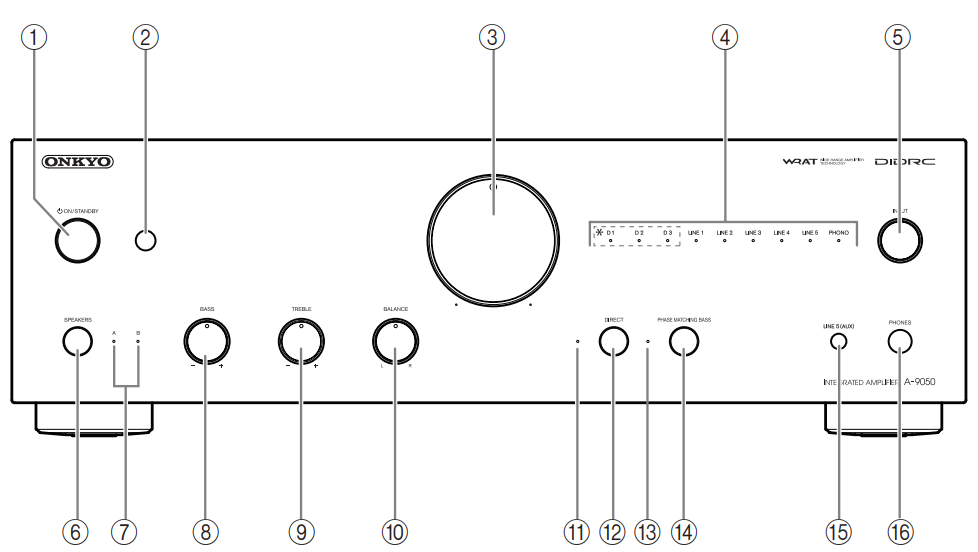
- On/Standby Button-Sets the integrated amplifier to On or Standby
- Remote Control sensor-Receives control signals from the remote controller
- Volume Controller-Adjusts the volume
- Input Source LEDs-Lights according to the selected input source (*A-9050 only)
- Input Selector-Selects the input sources in sequence
- Speakers Button-Selects Speakers A, Speakers B, or both
- A/B LEDs-Lights according to the selected speaker output
- Bass –/+ Controller-Adjusts the level of bass sounds
- Treble –/+ Controller-Adjusts the level of treble sounds
- Balance L/R Controller-Adjusts the balance of left and right channels
- Direct LED-Lights when the integrated amplifier is in Direct mode
- Direct Button-Enables or disables the Direct function
- Phase Matching Bass LED-Lights when the integrated amplifier is in Phase matching bass mode
- Phase Matching Bass Button-Enables or disables the Phase matching bass function
- Line5 (AUX) Jack-Connect playback devices with analog audio output
- Phones Jack-Connects headphones with a standard plug
Comments
0 comments
Article is closed for comments.