A-9030/9050-Remote Control
Please use this article to understand the functionality of the A-9030/A-9050 remote control.
Please Note
- You can also use the remote controller to control your Onkyo CD Player, Onkyo u Dock, or Onkyo Tuner
- With some components, the remote controller may not work, or only partially
- To control the Onkyo Dock and Onkyo Tuner, an RI connection is required
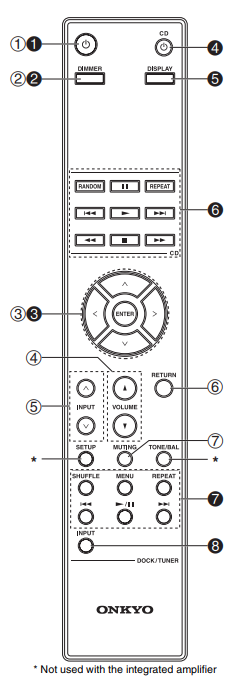
Power Button-Sets the integrated amplifier to On or Standby
- Dimmer Button-Adjusts the display brightness
- ^/v/</> and Enter Buttons-Select and adjust settings
- Volume ^/v Buttons-Adjust the volume of the integrated amplifier
- Input ^/v Buttons-Select an input source
- Return Button-Returns to the previous display when changing settings
- Muting Button-Mutes or unmutes the integrated amplifier
Controlling the Onkyo CD Player (Black Numbers)
4. CD Power Button
6. Playback Mode Buttons
Controlling the Onkyo Dock (Black Numbers)
1. Power Button
2. Dimmer Button
3. ^/v and Enter Buttons
5. Display Buttons
7. Network Tuner Control Buttons
8. Input Selector or Band Button
If the remote controller does not work properly:
- Make sure the batteries have been installed with the correct polarity (+/–)
- Replace both batteries with new ones (Do not mix different types of batteries or new and old batteries)
- Make sure the remote controller is not too far away from the integrated amplifier, or there’s an obstacle between them
- Make sure the integrated amplifier’s remote control sensor is not being subjected to bright light (inverter-type fluorescent light or sunlight)
- Make sure the integrated amplifier’s remote control sensor is not blocked or impeded by furniture/obstacles
Comments
0 comments
Article is closed for comments.