A-9030/9050-Connecting Your Speakers
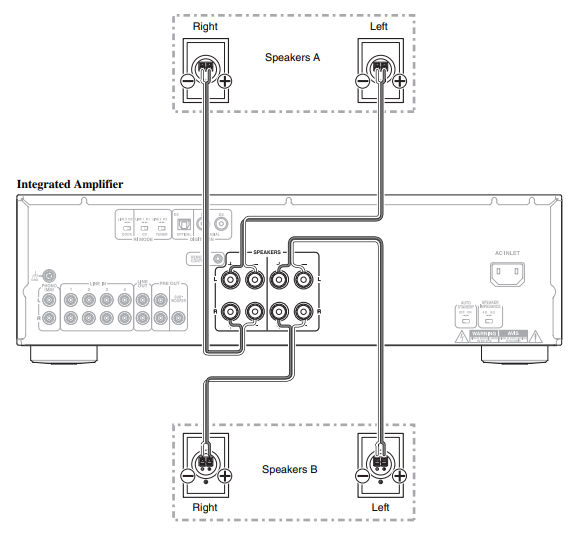
Please use the following guide to connect your passive speakers to the A-9030/A-9050 Integrated Amplifier.
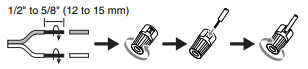
Screw-Type Speaker Terminals
Strip 1/2" to 5/8" (12 to 15 mm) of insulation from the ends of the speaker cables, and twist the bare wires tightly, as shown.
Banana Plugs (North American Models)
- If you are using banana plugs, tighten the speaker terminal before inserting the banana plug
- Do not insert the speaker code directly into the center hole of the speaker terminal
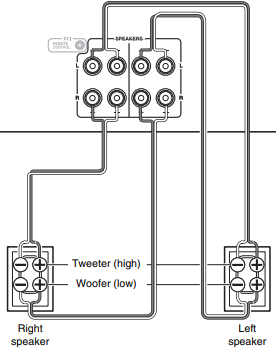
Bi-Wiring
Bi-wiring provides improved bass and treble performance. Using terminals of both SPEAKERS A and SPEAKERS B, it separates high frequency from low frequency signals.
Important:
- Bi-wiring can be used only with speakers that support bi-wiring and that have an impedance of 8-16 ohms
- When making the bi-wiring connections, be sure to remove the jumper bars that link the speakers’ tweeter (high) and woofer (low) terminals
- When making the bi-wiring connections, set SPEAKERS to A+B
Tip:
As shown on the illustration, the wiring terminals of SPEAKERS A are connected to the woofer and SPEAKERS B are connected to the tweeter. However, wiring them the other way around is also possible.
Please Note
- Make sure that the wires do not touch metal parts on the back panel or elsewhere
- Y plugs cannot be connected
- Two sets of speakers (Speakers A and Speakers B) can be connected to the integrated amplifier
- You can select which speakers to output audio to when listening to music
- You can also output audio from both sets of speakers
- If you use Speakers A or Speakers B, make sure to use speakers with an impedance of 4 to 16 ohms
- If you use Speakers A and Speakers B, make sure to use speakers with an impedance of 8 to 16 ohms
- Connecting speakers with an impedance less than 8 ohms may cause the protection circuit to activate
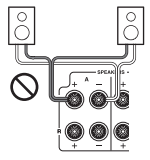
- When using only one speaker, or when playing back monaural audio, don’t connect a single speaker to both the left and right speaker terminals
- Pay close attention to speaker wiring polarity. In other words, connect positive (+) terminals only to positive (+) terminals, and negative (–) terminals only to negative (–) terminals.
- If you get them the wrong way around, the sound will be out of phase and will feel unnatural
- Be careful not to short the positive and negative wires. as it may damage the integrated amplifier
- Make sure the metal core of the wire does not have contact with the integrated amplifier’s rear panel as doing so may damage the integrated amplifier
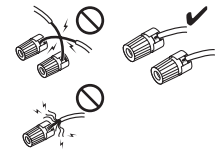
- Don’t connect more than one speaker wire to a single speaker terminal as doing so could damage the integrated amplifier or cause it to malfunction
If there is no sound:
- Make sure the integrated amplifier’s volume control is not set to minimum
- Make sure the correct input source is selected
- Make sure the integrated amplifier is not muted
- Make sure the speakers are connected correctly
- While headphones are connected, the speakers output no sound
If the sound is distorted or sound quality is not good:
- Make sure the speaker cables are connected with the correct polarity
- The integrated amplifier does not support digital formats other than PCM. Inputting a digital format other than PCM will cause loud noise.
- Check that the switch on the back of the integrated amplifier is set to the correct setting.
- Make sure all audio connecting plugs are pushed in all the way
- The sound quality can be affected by strong magnetic fields, such as those from a TV. Try moving any such devices away from the integrated amplifier
- Using cable ties to bundle audio cables with speaker or power cables may degrade the sound quality, so refrain from doing it
- Plug the power cord into an AC wall outlet
- Install the integrated amplifier on a sturdy rack or shelf. Position it so that its weight is evenly dispersed on its four legs. Do not install the integrated amplifier in a place with vibration or an unstable location.
Comments
0 comments
Article is closed for comments.