A-9030/9050-Connecting Onkyo RI Components
Please use the following guide to connect Onkyo RI components to the A-9030/A-9050 Integrated Amplifier.
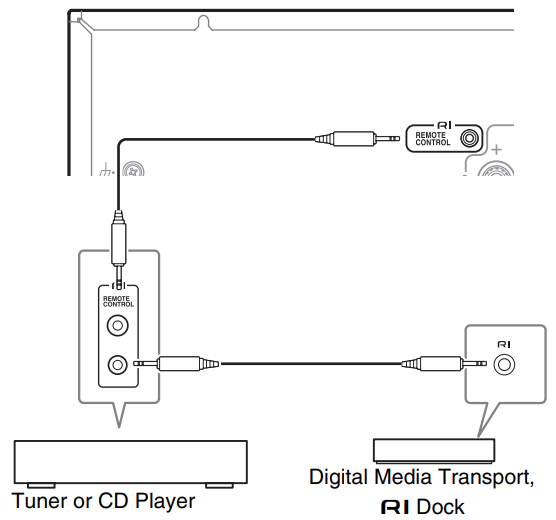
- Make sure that each Onkyo CD Player, Tuner or RI Dock is connected and that the RI MODE switch
is set correctly- Caution
• Settings will not be enabled even when the selector is changed in the Standby mode
• To change a setting, be sure to turn on the unit prior to making any changes
- Caution
- Make the RI connections
With RI (Remote Interactive), you can use the following special functions:
Auto Power On
- When you start playback on a component connected via RI while the integrated amplifier is on Standby, the integrated amplifier will automatically turn on and select that component as the input source
Direct Change
- When playback is started on a component connected via RI, the integrated amplifier automatically selects that component as the input source
System Off
- When you turn off the integrated amplifier, the components turn off automatically
Remote Control
- You can use the integrated amplifier’s remote controller to control your other RI-capable Onkyo Components, pointing the remote controller at the integrated amplifier’s remote control sensor instead of the component
- To operate the CD player, point the remote controller at the CD player
TIP
- Use only RI cables for RI connections
- RI cables are supplied with your Onkyo CD Player, Tuner or RI Dock
- If two RI jacks are present, you can use either one indifferently as they work the same way
- Connect only an Onkyo CD Player, Tuner or RI Dock to the RI jack
- Connecting other manufacturer’s components may cause a malfunction
- Only Onkyo CD Players, Tuners, and RI Docks are supported by the integrated amplifier’s RI
- With other components such as MD recorders, the RI won’t work properly
- Some components may not support all RI functions
- Refer to the manuals supplied with your Onkyo CD Players, Tuner or RI Docks
- The CD Players only support the Auto Power On and Direct Change functions
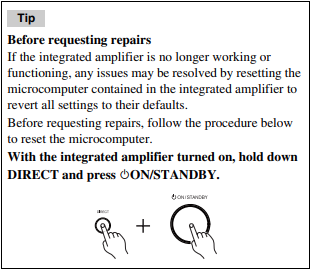
If the RI interlock does not function properly:
- Check that each device is connected correctly and that the RI MODE switch is set correctly
- Check that the switch on the back of the integrated amplifier is set to the correct setting
- The settings are not enabled when the switch is changed during the Standby mode. To change a setting, be sure to turn on the unit prior to making any changes.
- The connecting method may vary depending on the device that will be connected. Please refer to the RI connection section in the owner’s manual of the connected device
Comments
0 comments
Article is closed for comments.