A-9030/9050-Turning the Unit On/Off
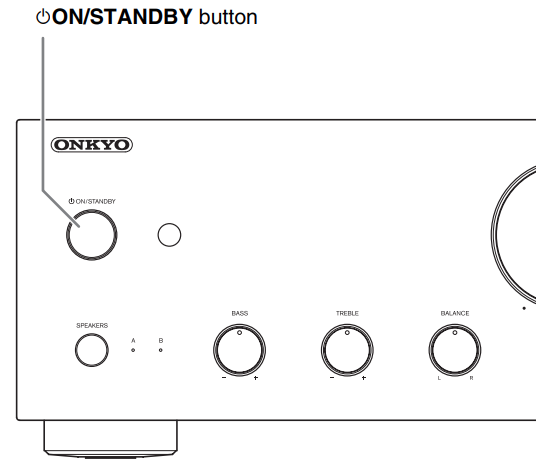
Using the Front Panel Buttons
To Turn ON
- Press the On/Standby button
- The Speakers (A/B) and Input source LEDs blink, then light up for a short time
To Turn OFF
- Press the On/Standby button
- The integrated amplifier enters standby mode and the LED goes off
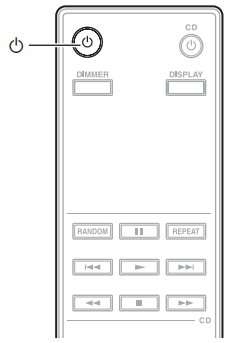
Using the Remote Control
To Turn OFF
- Press the Power button
- The Speakers (A/B) and Input source LEDs blink, then light up for a short time
To Turn OFF
- Press the Power button
- The integrated amplifier enters standby mode and the LED goes off
TIP
- After a certain time of warming up, the internal temperature of the integrated amplifier stabilizes, and the sound is softened
- The integrated amplifier remembers the state when power was last turned off, and returns to that state
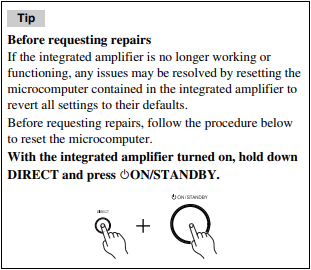
If the unit will not turn on:
- Make sure that the power cord is properly plugged into the wall outlet
- Unplug the power cord from the wall outlet, wait 5 seconds or more, then plug it in again
If the unit turns off unexpectedly:
- When the protection circuit is activated (because of speaker short-circuit, overload, or over-current), the integrated amplifier enters Standby mode. Remove the source of the problem and turn the integrated amplifier back on
- Check that the switch on the back of the integrated amplifier is set to the correct setting (Speaker Impedance selector and Auto Standby selector)
- The settings are not enabled when the switch is changed during the Standby mode.
To change a setting, be sure to turn on the unit prior to making any changes.
Comments
0 comments
Article is closed for comments.