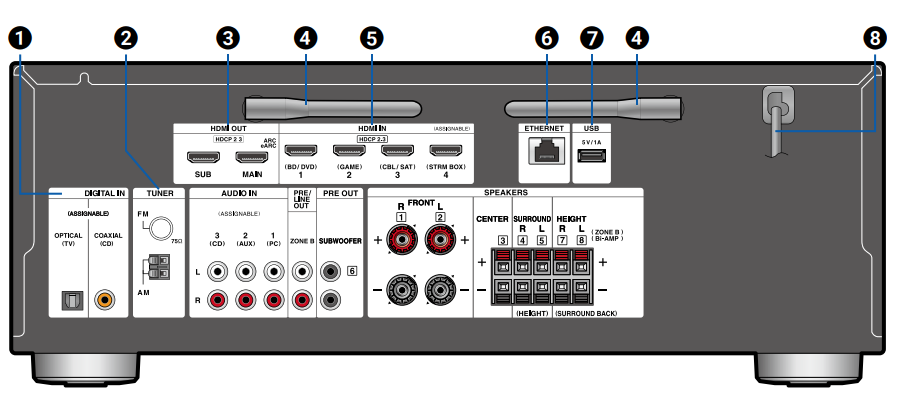
DIGITAL IN OPTICAL/COAXIAL Jacks: Input TV or AV component digital audio signals with a digital optical cable or digital coaxial cable.
TUNER AM/FM Terminal: Connect the supplied antennas.
HDMI OUT Jacks: Transmit video signals and audio signals with an HDMI cable connected to a monitor such as a TV or projector.
Wireless Antenna: Used for WI-Fi connection or when using a BLUETOOTH enabled device. Adjust the angles according to the connection status.
HDMI IN Jacks: Transmit video signals and audio signals with an HDMI cable connected to an AV component.
ETHERNET Port: Connect to the network with an Ethernet cable.
USB Port: Connect a USB storage device to play music files. You can also supply power (5 V/1 A) to USB devices with a USB cable.
Power cord
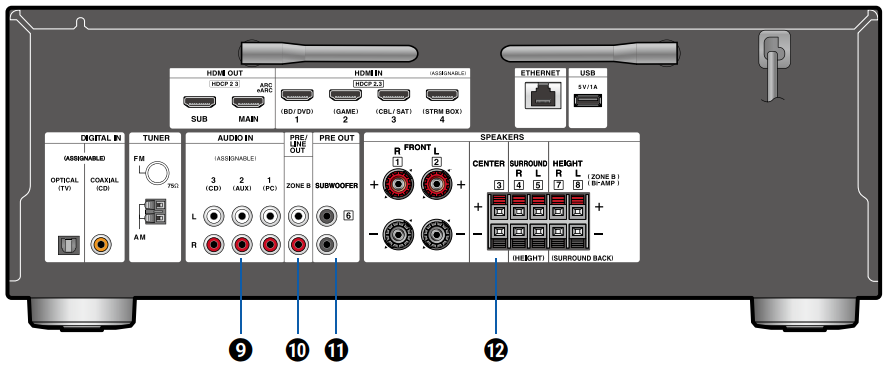
AUDIO IN Jacks: Input AV component audio signals with an analog audio cable.
ZONE B PRE/LINE OUT Jacks: Simultaneously output the same audio source as the speakers (ZONE A) connected to this unit by connecting this unit to wireless headphones, wireless speaker transmitter, etc., using an analog audio cable.
SUBWOOFER PRE OUT Jacks: Connect a powered subwoofer with a subwoofer cable. Up to two powered subwoofers can be connected. The same signal is output from each SUBWOOFER PRE OUT jack.
SPEAKERS Terminals: Connect speakers with speaker cables. (FRONT L/R terminals support banana plugs. Use a plug 4 mm in diameter. Y plug connection is not supported.)
Comments
0 comments
Please sign in to leave a comment.