TX-NR5100 - Setup Menu - Speakers
Configuration
Speaker Channels
Default Value: 7.1 ch

Subwoofer
Default Value: Yes

Height Speaker
Set the speaker type when height speakers are connected. Select from "Top Middle", "Top Rear", "Rear High", "Dolby Speaker (Front)", "Dolby Speaker (Surr)", "Front High" and "Top Front" according to the type and layout of the connected speakers.
- If an item cannot be selected even though connection is correct, check that the settings in "Speaker Channels" matches the number of connected channels.
Zone B Speaker
Default Value: No
Set whether speakers are connected to ZONE B speaker terminals.
- This setting cannot be selected when "Speaker Channels" is set to "6.1 ch", "7.1 ch", "4.1.2 ch" or "5.1.2 ch".

Zone B Output Level
Default Value: Fixed
When audio is output to ZONE B, set whether the volume is adjusted with the integrated amplifier in the separate room or with this unit.
- This setting is fixed to "Variable" when "Zone B Speaker" is set to "Yes".

Bi-Amp
Default Value: No
Set whether the front speakers are bi-amp connected.
- This setting cannot be selected when surround back speakers or height speakers are used.

Speaker Impedance
Default Value: 6 Ohms or Above
Set the impedance (Ω) of the connected speakers.
- For impedance, check the indications on the back of the speakers or their instruction manual.

Crossover
Change the settings of crossover frequencies.
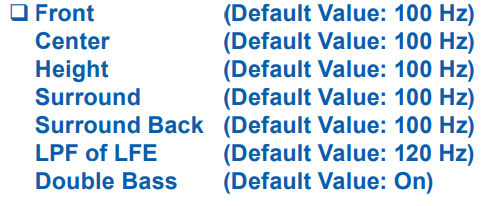
Front:
Select the crossover frequency from "40 Hz" to "200 Hz" to start outputting frequencies for each channel. "Full Band": Full band will be output.
- If "Configuration" - "Subwoofer" is set to "No", "Front" is fixed to "Full Band", and the low pitched range of the other channels is output from the front speakers. Refer to the instruction manual of your speakers to make the setting.
Center, Height, Surround: Select the crossover frequency from "40 Hz" to "200 Hz" to start outputting
frequencies for each channel. "Full Band": Full band will be output.
- "Full Band" can be selected only when "Front" is set to "Full Band".
- If the item cannot be selected even though connection is correct, check if the setting in "Configuration" - "Speaker Channels" matches the number of connected channels.
Surround Back:
Select the crossover frequency from "40 Hz" to "200 Hz" to start outputting frequencies for each channel. "Full Band": Full band will be output.
- "Full Band" can be selected only when "Surround" is set to "Full Band".
- If the item cannot be selected even though connection is correct, check if the setting in "Configuration" - "Speaker Channels" matches the number of connected channels.
LPF of LFE:
Set the low-pass filter for LFE (low-frequency effect) signals in order to pass only the lower frequency signals than the set value, and thus cancel unwanted noises. The low-pass filter is effective only on sources with LFE channel. The value from "80 Hz" to "120 Hz" can be set.
"Off": When this function is not used
Double Bass:
This can be selected only when "Configuration" - "Subwoofer" is set to "Yes" and "Front" is set to "Full Band". Boost bass output by feeding bass sounds from the front left and right speakers and the center speaker to the subwoofer.
"On": Bass output is boosted.
"Off": Bass output is not boosted.
- This function is not automatically set even if AccuEQ Room Calibration is performed.
Distance
Set the distance from each speaker to the listening position.
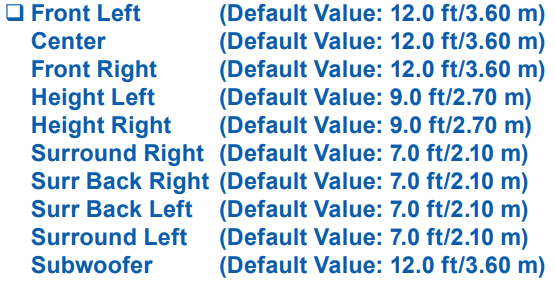
- The unit of distance can be changed by pressing the MODE button on the remote controller. When using the unit "feet", the setting is available in increments of 0.1 ft from 0.1 ft to 30.0 ft. When using the unit "meter", the setting is available in increments of 0.03 m from 0.03 m to 9.00 m.
(Height Left, Height Right):
- This setting cannot be changed when "Configuration" - "Speaker Channels" is set to "4.1.2 ch" or "5.1.2 ch", and the audio output destination is set to "On (A+B)".
(Surr Back Right, Surr Back Left):
- This setting cannot be changed when the audio output destination is set to "On (A+B)" or "On (B)".
Level Calibration
Adjust the volume level of each speaker.
- This setting cannot be selected when the audio output destination is set to "On (B)".
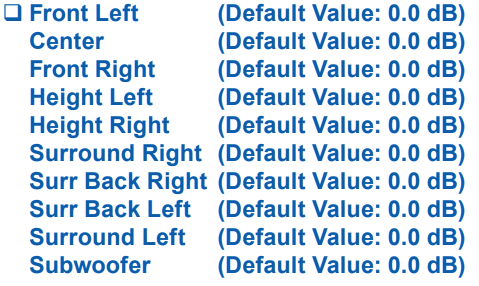
Select a value between "-12.0 dB" and "+12.0 dB" ("-15.0 dB" and "+12.0 dB" for Subwoofer) (in 0.5 dB increments). A test tone will be output each time you change the value. Select the desired level.
(Height Left, Height Right):
This setting cannot be changed when "Configuration" - "Speaker Channels" is set to "4.1.2 ch" or "5.1.2 ch", and the audio output destination is set to "On (A+B)".
(Surr Back Right, Surr Back Left):
This setting cannot be changed when the audio output destination is set to "On (A+B)".
Dolby Enabled Speaker
Change the settings of Dolby Enabled Speakers.
- This setting can be selected when "Configuration" - "Height Speaker" is set to "Dolby Speaker".
Distance from the ceiling (Default Value: 6.0 ft/1.80 m)
Set the distance between the Dolby Enabled Speaker and the ceiling. Select between "0.1 ft"/"0.03 m" and "15.0 ft"/"4.50 m" ("0.1 ft"/"0.03 m" units).
- The unit of distance (ft/m) is displayed using the unit selected for the "Distance" setting.
AccuReflex (Default Value: Off)
You can enhance the reflection effect of Dolby Enabled Speakers from the ceiling.

Equalizer Settings
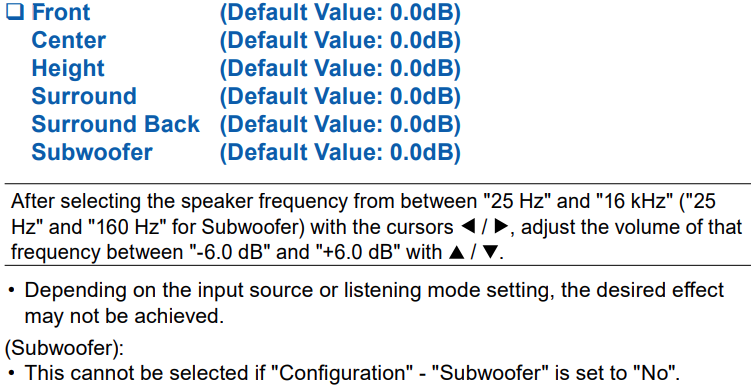
You can adjust the output volume of the range for each connected speaker. Adjust the volume of different sound ranges for each speaker. You can set three different equalizers in Preset 1 to 3. The number of frequencies that can be selected for each speaker is up to five bands for the Subwoofer and nine bands for the other speakers.
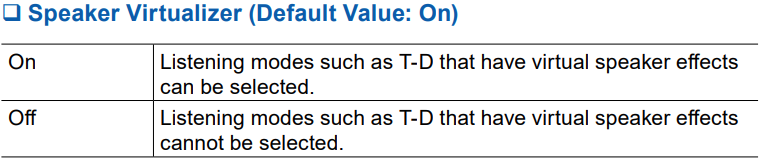
Speaker Virtualizer
The Speaker Virtualizer function can be switched between On and Off.
Comments
0 comments
Please sign in to leave a comment.