TX-NR5100 - Setup Menu - Power Management
Change the settings for the power-save function.
Sleep Timer
Default Value: Off

Auto Standby
Default Value: Off
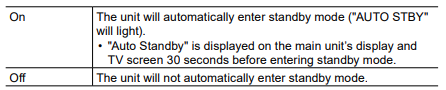
This setting allows the unit to enter standby mode automatically after 20 minutes of inactivity without any video or audio input. (When "USB Power Out at Standby" or "Network Standby" is enabled, the unit enters the HYBRID STANDBY mode which minimizes the increase in power consumption.)
USB Power Out at Standby
Default Value: Off
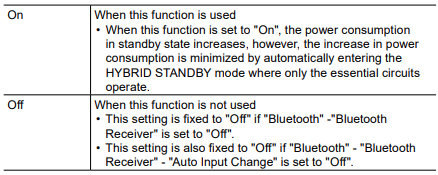
Devices connected to the USB port (5 V/1 A) on the rear of the unit can be supplied with electricity even when this unit is in standby mode when this function is "On".
- When this function is set to "On", the power consumption in standby state increases, however, the increase in power consumption is minimized by automatically entering the HYBRID STANDBY mode where only the essential circuits operate.
Network Standby
Default Value: On
When this function is set to "On", the network function works even in standby state, and you can turn on the power of the unit via network using an application such as Onkyo Controller that can control this unit.
- When this function is set to "On", the power consumption in standby state increases, however, the increase in power consumption is minimized by automatically entering the HYBRID STANDBY mode where only the essential circuits operate. Note that even if this function is set to "Off", when any of the HDMI CEC, HDMI Standby Through, USB Power Out at Standby and Bluetooth Wakeup functions is enabled, this function will be in "On" state regardless of the setting.
- When connection to the network is lost, "Network Standby" may be disabled to reduce power consumption. In such a case, turn the unit on by using the power button on the remote controller or main unit
Bluetooth Wakeup
Default Value: Off
This function wakes up the unit on standby by connecting a BLUETOOTH enabled device.
- Wait for a while if "Network Standby" and "Bluetooth Wakeup" cannot be selected. It can be selected when the network function is activated.
Comments
0 comments
Please sign in to leave a comment.