TX-8260-Entering Text
Text entry, for passwords, etc., uses the following procedure.
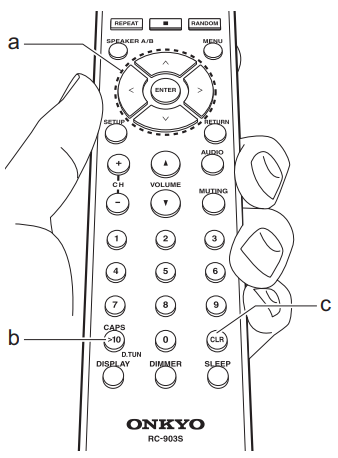
- Select the characters or symbols with Up/Down/Left/Right (a).

- Press ENTER (a) to confirm the selected character. Repeat this to enter text.
Press CAPS (b) to change the characters to be enter, for example to switch between upper and lower case.
Press CLR (c) to delete all the input characters. - After completing input, select "OK" with Up/Down/Left/Right (a) and press ENTER (a).

Characters that can be Entered
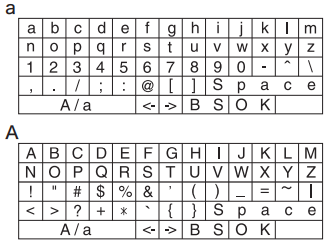
Space: A single space the size of a character is entered.
A/a: Switches between characters displayed. (a-> A)
 : Select to move the cursor.
BS (backspace): Removes a character on the left of the cursor. The cursor moves left.
OK: Confirms the entered content.
Comments
0 comments
Please sign in to leave a comment.