A-9110-Front Panel Layout
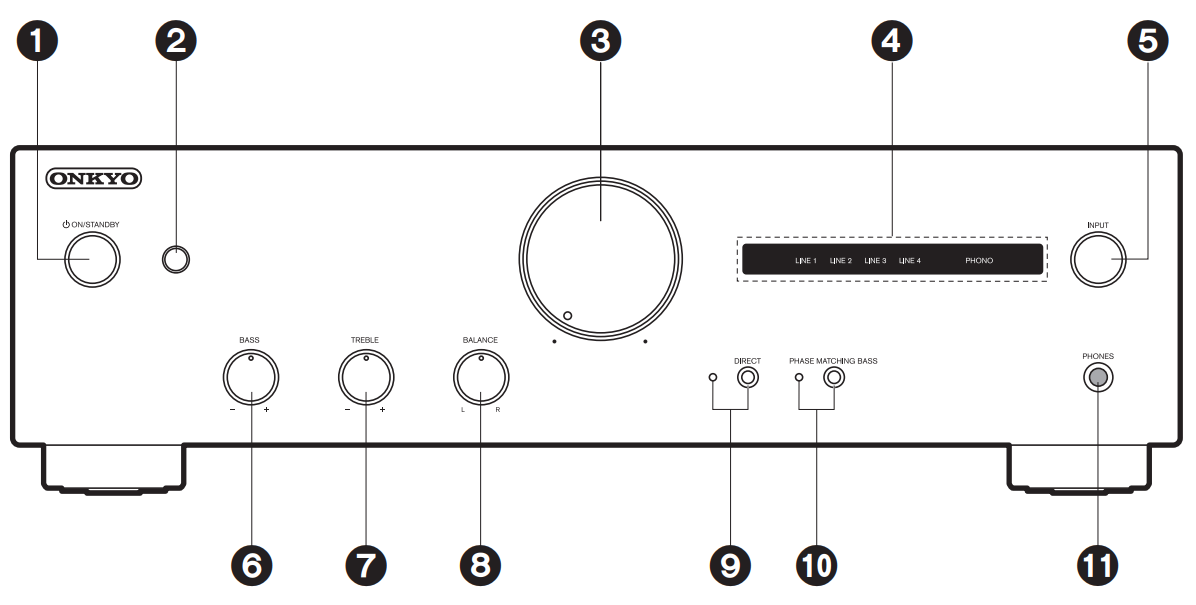
- POWER ON/STANDBY button
- Remote control sensor: Receives signals from the remote controller.
The signal range of the remote controller is within about 16y/5 m, at an angle of 20° on the perpendicular axis and 30° to either side.
- Volume controller
- Input source indicators: The indicators light according to the selected input source.
The indicator for the selected input source blinks when MUTING is active.
- INPUT dial: Switches the input source to be played.
- BASS -/+ controller: Enhance or moderate the bass range of the speakers.
- TREBLE -/+ controller: Enhance or moderate the treble range of the speakers.
- BALANCE L/R controller: Adjust the left/right audio balance.
- DIRECT button/indicator: Switch the DIRECT feature on and off. The indicator lights when the DIRECT feature is on.
- PHASE MATCHING BASS button/indicator: Switch the PHASE MATCHING BASS feature on and off.
The indicator lights when the PHASE MATCHING BASS feature is on.
- PHONES jack: Connect stereo headphones with a standard plug (Ø1/4"/6.3 mm diameter).
Comments
0 comments
Please sign in to leave a comment.