A-9110-Remote Control Layout
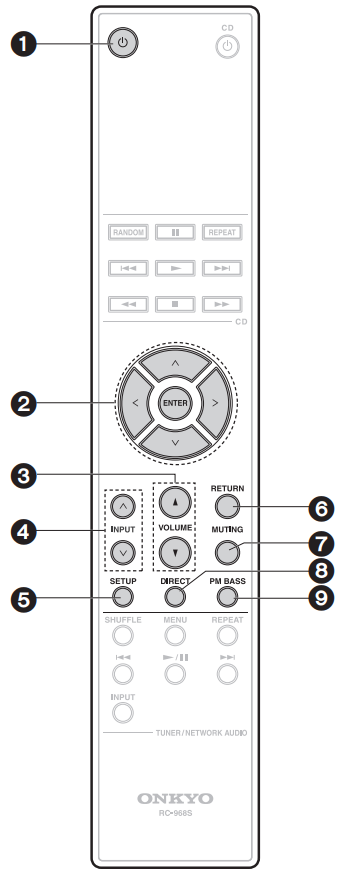
- POWER button: Sets this unit to On or Standby.
- Cursors (D/C/B/A), ENTER button: Select the item with the cursors and press ENTER to confirm.
- VOLUME buttons
- INPUT(D/C) buttons: Switches the input source to be played.
- SETUP button: Switches to the settings menu. Make speaker impedance settings, subwoofer output settings (p16), and auto standby settings.
- RETURN button: Returns the display to the previous display/state during setting.
- MUTING button: Temporarily mutes audio. Press again to cancel muting.
- DIRECT button: Switch the DIRECT feature on and off.
- PM BASS button: Switch the PHASE MATCHING BASS feature on and off.
Comments
0 comments
Please sign in to leave a comment.