A-9110-Using the Remote
You can operate Onkyo CD players, tuners, network audio players, and RI docks with the remote controller of this unit.
Operating an Onkyo CD player
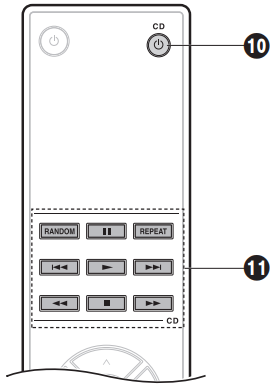
Point the remote controller at the CD player.
10.CD POWER button
11.Play mode buttons
- If you have a Network CD player, then the RI function enables use of the 12 and 14 buttons when you connect it with an RI cable. When using these buttons, point the remote controller at the remote control sensor of this unit.
Operating an Onkyo Tuner, Network Audio Player, or RI dock
You can use the RI function to centrally control with the remote controller of this unit by connecting this unit and the other audio components with an RI cable. Point the remote controller at the remote control sensor of this unit to operate.
12.Cursor buttons (^/ V/</>), ENTER button: Select items with the cursor buttons and press ENTER to confirm.
13. Play mode buttons
- When using a network audio player, the MENU button works as a back button that takes you back one step in the settings to the previous display or state.
14. INPUT button
- When using a tuner, this works as a BAND button.
- The INPUT button is not used for RI docks.
Comments
0 comments
Please sign in to leave a comment.