A-9110-Connecting with Onkyo RI Components
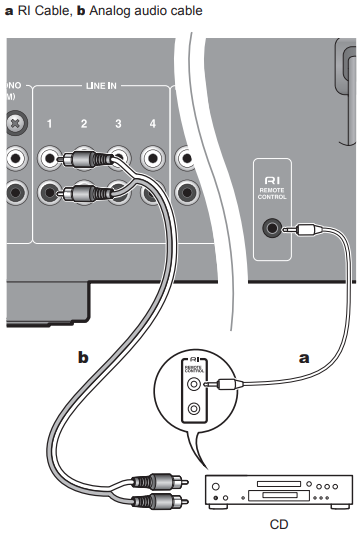
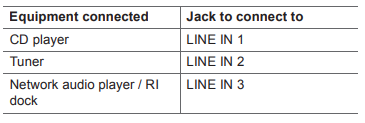
If you have an Onkyo CD player, tuner, network audio player, or RI dock, if these have RI jacks, then you can connect them to this unit and link switching between on and standby, and use the remote controller of this unit to centrally control the equipment. (RI function) These linked operations are enabled by the connection with an RI cable between the equipment with an RI jack and this unit, and the connection using an Analog audio cable. Refer to the following table for connections.
The RI Function
The follow system functions can be used with the RI function.
- Some functions may not be supported depending on the product even when an RI connection is used.
Auto Power On
When this unit is in standby mode, if a component connected by an RI cable is turned on, this unit automatically turns on.
Direct change
When playback is started on a component connected via RI, the unit selects that component as the input source.
System off
When this unit is turned off, components connected by an RI cable are automatically turned off.
Remote controller operations
You can use the remote controller of this unit to centrally control components by connecting with an RI cable.
- The RI feature on this unit supports Onkyo CD players, tuners, network audio players, and RI docks only. It does not work properly with other devices such as MD recorders.
Comments
0 comments
Please sign in to leave a comment.