TX-NR696 - Display
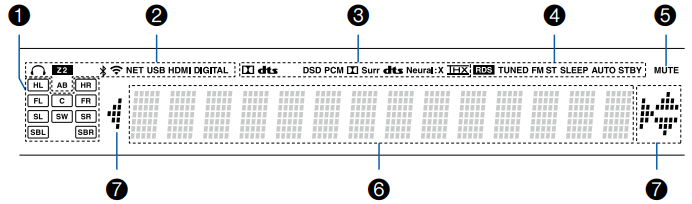
1. Speaker/Channel Display: Displays the output channel that corresponds to the selected listening mode.
2. Lights in the following conditions.
HEADSET SYMBOL: Headphones are connected.
Z2: ZONE 2 is on.
BLUETOOTH SYMBOL: Connected by BLUETOOTH.
WIFI SYMBOL: Connected by Wi-Fi.
NET: Lights when connected to the network with the "NET" input selector.
- It will blink if incorrectly connected to the network.
USB: Lights when the "NET" input selector is selected, a USB device is connected and the USB input is selected.
- It will blink if the USB device is not properly connected.
HDMI: HDMI signals are input and the HDMI input is selected.
DIGITAL: Digital signals are input and the digital input is selected.
A: Audio in output only to ZONE A.
B: Audio is output only to ZONE B.
AB: Audio is output to both ZONE A and ZONE B.
3. Lights according to the type of input digital audio signal and the listening mode.
4. Lights in the following conditions.
RDS (European, Australian and Asian models): Receiving RDS broadcasting.
TUNED: Receiving AM/FM radio.
FM ST: Receiving FM stereo.
SLEEP: Sleep timer is set.
AUTO STBY: Auto Standby is set.
5. Blinks when muting is on.
6. Displays various information of the input signals.
- "DialogNorm: X dB" ("X" is a numerical value) may be displayed when software recorded in Dolby lineage or DTS lineage audio formats is played.
For example, if "DialogNorm: +4 dB" is displayed, the source being played is recorded with 4 dB plus the THX standard level. If you play it with the THX standard level, lower the volume by 4 dB.
7. This may light when operating with the "NET" input selector.
Comments
1 comment
The instructions are vague. How do I get sounds from it?
Please sign in to leave a comment.