TX-NR696 - Speaker Layout and Connection
Speaker Layout
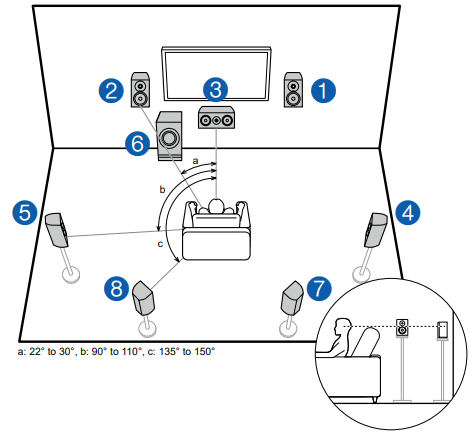
This is a 7.1 Channel System that consists of the basic 5.1 Channel System and added surround back speakers.
Front speakers output the front stereo sound, and a center speaker outputs the sound of the center of the screen, such as dialogs and vocals. Surround speakers create the back sound field. Powered subwoofer reproduces the bass sound, and creates the rich sound field. Surround back speakers improves the sense of envelopment and connectivity of sound in the back sound field, and provides a more real sound field.
The front speakers should be positioned at ear height while the surround speakers should be positioned just above ear height. The center speaker should be set up facing the listening position at an angle. Placing the powered subwoofer between the center speaker and the front speaker gives you a natural
sound even when playing music sources. The surround back speakers should be positioned at ear height.
- If surround back speakers are installed, be sure to install surround speakers
as well.
1,2 Front Speakers
3 Center Speaker
4,5 Surround Speakers
6 Powered Subwoofer
7,8 Surround Back Speakers
Connecting the Speakers
Note regarding speaker impedance:
- Connect speakers with an impedance of 4 Ω to 16 Ω. If any of the speakers to be connected has an impedance of 4 Ω or more and less than 6 Ω, set "Speaker Impedance" to "4ohms" for "Speaker Setup" in the Initial Setup section.
- When setting "Speaker Impedance" from the Setup menu, press on the remote controller, and set "2. Speaker" - "Configuration" - "Speaker Impedance" to "4ohms".
Setup
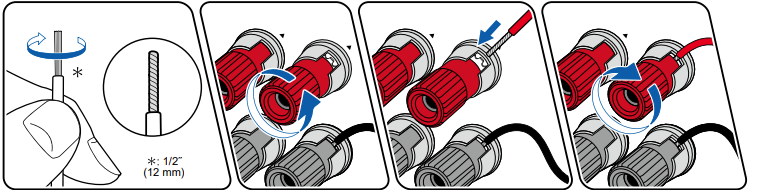
Make correct connection between the unit's jacks and speaker's jacks (+ side to + side, and - side to - side) for each channel.
CAUTION
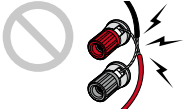
If the connection is wrong, a bass sound will not be reproduced properly due to reverse phase. Twist the wires exposed from the tip of the speaker cable so that the wires do not stick out of the speaker terminal
when connecting. If the exposed wires touch the rear panel, or the + side and – side wires touch each other, a malfunction may occur.
Comments
0 comments
Please sign in to leave a comment.