HT-S3910 - Speaker Installation
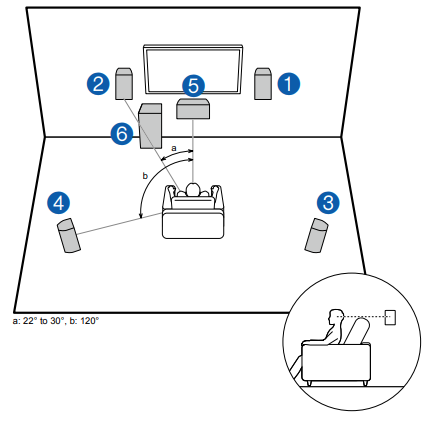
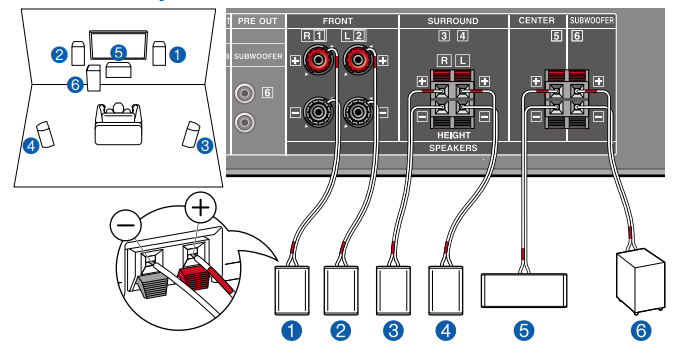
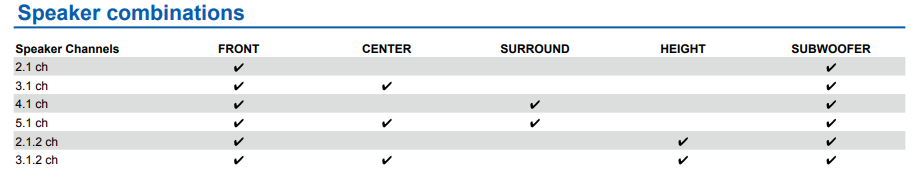
This is a basic 5.1 Channel System. Front speakers output the front stereo sound, and a center speaker outputs the sound of the center of the screen, such as dialogs and vocals. Surround speakers create the back sound field.
Subwoofer reproduces the bass sound, and creates the rich sound field. The front speakers should be positioned at ear height while the surround speakers should be positioned just above ear height. The center speaker should be set up facing the listening position at an angle. Placing the subwoofer between
the center speaker and the front speaker gives you a natural sound even when playing music sources.
1,2 Front Speakers
3,4 Surround Speakers
5 Center Speaker
6 Subwoofer
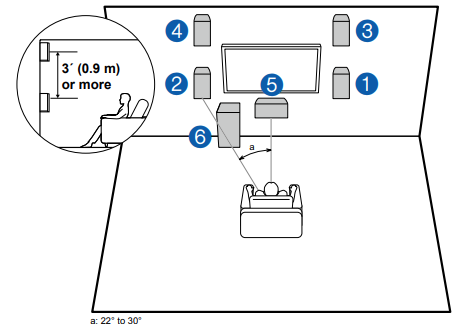
Front High Speakers Installation Example
This is a 3.1-channel system consisting of front speakers, a center speaker, and a subwoofer, with the installation of front high speakers, a type of height speaker.
Installing the height speakers will enrich the sound field feeling in the upper space. Front high speakers should be situated at least 3'/0.9 m higher than the front speakers. They should also be put directly above the front speakers.
1,2 Front Speakers
3,4 Front High Speakers
5 Center Speaker
6 Subwoofer
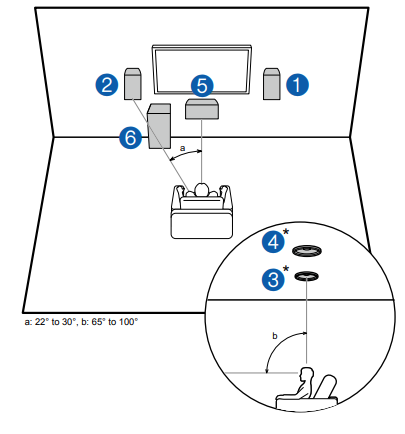
Ceiling Speakers Installation Example
This is a 3.1-channel system consisting of included front speakers, a center speaker, and a subwoofer, with the addition of top middle speakers sold separately, a type of height speaker. Installing the height speakers will enrich the sound field feeling in the upper space. Fit top middle speakers on the ceiling directly above the listening position. The distance between each pair should match the distance between the two front speakers.
- Dolby Laboratories recommends the setups of these types of height speakers to obtain the best Dolby Atmos effect.
1,2 Front Speakers
3,4 Top Middle Speakers*
5 Center Speaker
6 Subwoofer
* Optional items
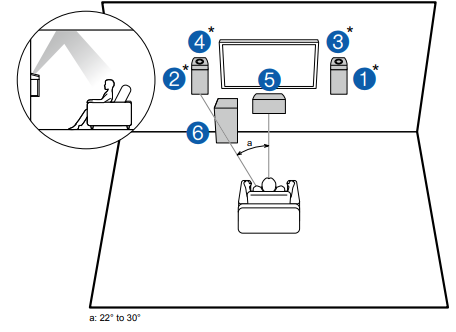
Dolby Enabled Speakers (Dolby Speakers) Installation Example
Separately sold Dolby-enabled speakers have been selected as the height speakers for this system. Dolby enabled speakers are special speakers designed to face the ceiling, so that the sound is heard from overhead by bouncing the sound off the ceiling.
Place Dolby enabled speakers (front) above the front speakers. The front speakers included with this unit are not designed for Dolby enabled speakers to be installed on top of them, so do not use them with this system. Be sure to use sold separately front speakers.
1,2 Front Speakers*
3,4 Dolby Enabled Speakers (Front)*
5 Center Speaker
6 Subwoofer
* Optional items
Connecting the Speakers
Note-Speaker Impedance
When using the included speakers, setup explained in this section is not required. When using speakers sold separately, use speakers with impedance of 4 Ω to 16 Ω. If any of the speakers to be connected has an impedance of 4 Ω or more and less than 6 Ω, set "Speaker Impedance" to "4 ohms" for "Speaker Setup" in the Initial Setup section.
When setting "Speaker Impedance" from the Setup menu, press on the remote controller, and set "2. Speaker" - "Configuration" - "Speaker Impedance" to "4 ohms".
Connect the Speaker Cables
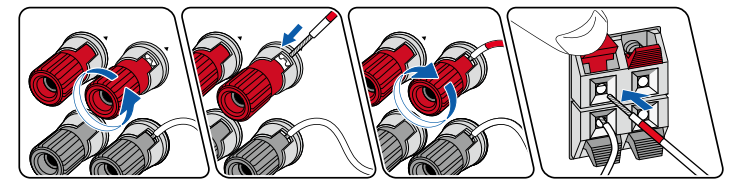
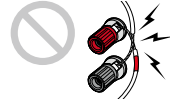
Make correct connection between the unit's jacks and speaker's jacks (+ side to + side, and - side to - side) for each channel. If the connection is wrong, a bass sound will not be reproduced properly due to reverse phase. The wires exposed from the tip of the speaker cable do not stick out of the speaker terminal when connecting. If the exposed wires touch the rear panel, or the + side and - side wires touch each other, a malfunction may occur.
Connecting a 5.1 Channel System
Speaker Setup Settings
- Speaker Channels: 5.1 ch
- Subwoofer: Yes
- Height Speaker: ---
- Speaker Impedance: Set any value
Setup
In order to optimize the sound field effect, some settings must be made in the Setup menu after the Initial Setup is completed. Press on the remote controller, then set "2. Speaker" - "Distance" and "Level Calibration".
Connecting a 3.1.2 Channel System
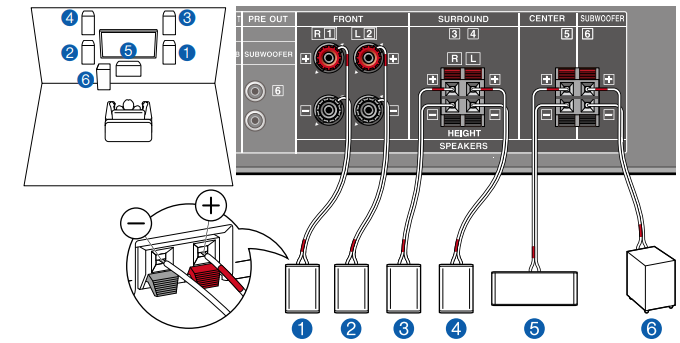
This is a combination of the 3.1 Channel System and front high speakers. A front high speaker is a type of height speaker.
You can select only one set of height speakers from the following three types for connection.
- Front High Speakers Installation Example
- Ceiling Speakers Installation Example
- Dolby Enabled Speakers (Dolby Speakers) Installation Example
Speaker Setup Settings
- Speaker Channels: 3.1.2 ch
- Subwoofer: Yes
- Height Speaker: ---
- Speaker Impedance: Set any value
Setup
In order to optimize the sound field effect, some settings must be made in the Setup menu after the Initial Setup is completed. Press on the remote controller, then set "2. Speaker" - "Distance" and "Level Calibration". When using separately sold speakers, also set "2. Speaker" - "Crossover".
Comments
0 comments
Please sign in to leave a comment.