TX-NR696 - Connecting a TV
Please use the following instructions to connect your TV to the TX-NR696 AV Receiver.
Connection with the TV differs depending on whether the TV supports the ARC (Audio Return Channel) function or not.
- The ARC function transmits the audio signals of the TV via an HDMI cable, and plays the audio of the TV on this unit.
- To check if the TV supports the ARC function, refer to the instruction manual of the TV, etc.
To ARC TV
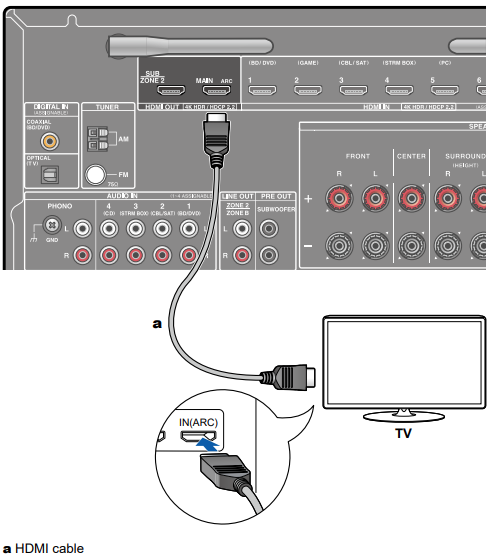
If the TV supports the ARC (Audio Return Channel) function, use only the HDMI cable to connect with the TV. Use the ARC-compatible HDMI IN jack of the TV for connection.
Setup
- Settings are required to use the ARC function. Select "Yes" for "3. ARC Setup" in Initial Setup. If "No, Skip" is selected, settings are required in the Setup menu after Initial Setup is completed. Press on the remote controller, and set "5. Hardware" - "HDMI" - "Audio Return Channel" to "On".
- For detailed settings for TV connection, CEC function and audio output, refer
to the instruction manual of the TV.
Another TV or projector can be connected to the HDMI OUT SUB jack. Switch between MAIN and SUB using the HDMI MAIN/SUB button on the remote controller or "Quick Menu".
- Note that this jack is not ARC-compatible.
- If devices with different resolutions are connected to HDMI OUT MAIN jack and SUB jack, images are output with the lower resolution.
- If a 4K high-quality video is played, use a Premium High Speed HDMI Cable or Premium High Speed HDMI Cable with Ethernet whose package has a "PREMIUM Certified Cable" label.
To Non-ARC TV
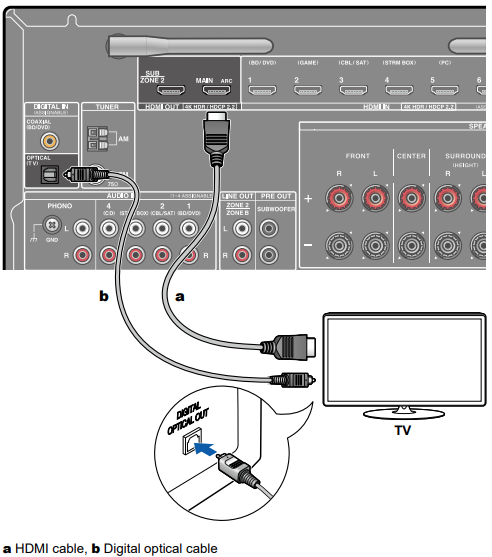
If the TV does not support the ARC (Audio Return Channel) function, connect an HDMI cable and digital optical cable.
- If you use a cable set-top box, etc. connected to the input jack of this unit to watch TV (without using a TV’s built-in tuner), connection with a digital optical cable or analog audio cable is not required.
- Another TV or projector can be connected to the HDMI OUT SUB jack. Switch between MAIN and SUB using the HDMI MAIN/SUB button on the remote controller or "Quick Menu". Note that this jack is not ARC-compatible.
- If devices with different resolutions are connected to HDMI OUT MAIN jack and SUB jack, images are output with the lower resolution.
- If a 4K high-quality video is played, use a Premium High Speed HDMI Cable or Premium High Speed HDMI Cable with Ethernet whose package has a "PREMIUM Certified Cable" label.
Comments
6 comments
Your clients need a step by step instruction set covering the use of a projector as the only screen available. My first guesses were wrong, yet the wonderful machine was able to figure out the proper wiring even from a user slow to take a hint. I had proper sound without any picture and all I needed after turning the unit on with properly wired speakers was instructions from the screen. *Another one of those puzzles which is easy for your technician and durn confusing for 80 year olds with declining awareness.
This article is of no use. I have everything connected and there is no sound.
I did exactly the same, Main out with ARC to ARC TV HDMI. Sound was playing through my receiver after I initialized ARC on the receiver. But after I switch to Bluetooth and then I couldn’t get the sound back from my TV. What do I need to set to get the sound back from my tv again?
@Three Stooges, Check you TVs PCM setting. The 696 is very picky about this setting, Toggle it to see what works
This simply does not work 0 out of 10
Change the PCM setting to ON do not use Auto
Please sign in to leave a comment.