TX-NR696 - Connecting an HDMI AV Component
Use the following instructions to connect an AV component to the TX-NR696 AV Receiver using a HDMI cable.
This is a connection example of an AV component equipped with an HDMI jack.
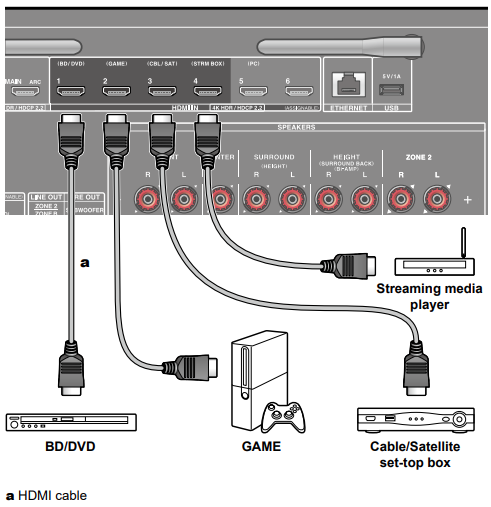
When connecting with an AV component that conforms to the CEC standard, you can use the HDMI CEC function that enables linking with input selectors, etc. and the HDMI Standby Through function that can transmit video and audio signals of the AV component to the TV even if this unit is in standby mode.
- If a 4K high-quality video is played, use a Premium High Speed HDMI Cable or Premium High Speed HDMI Cable with Ethernet whose package has a "PREMIUM Certified Cable" label.
Setup
- The HDMI CEC function and HDMI Standby Through function are automatically enabled if you select "Yes" for "3. ARC Setup" in Initial Setup.
- If "No, Skip" is selected, settings are required in the Setup menu after Initial Setup is completed. Press on the remote controller, and select "5. Hardware" - "HDMI" to make the settings.
- To enjoy digital surround sound including Dolby Digital, set the audio output of the connected Blu-ray Disc player etc. to the Bitstream output.
Comments
0 comments
Please sign in to leave a comment.