TX-NR696 - Multi-zone Connection
The following describes multi-zone and antenna connection with the TX-NR696 AV Receiver.
Connecting a TV (ZONE 2)
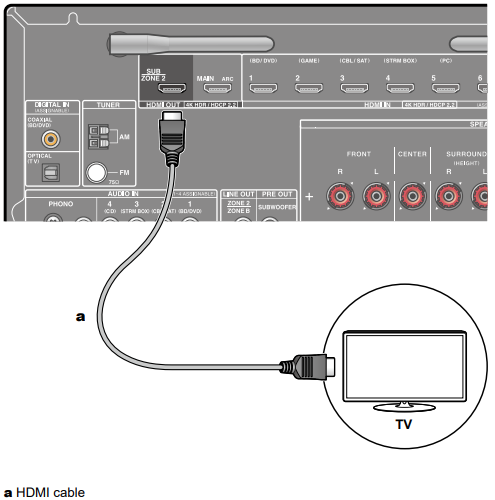
While a disc is played on a Blu-ray Disc player in the main room (where this unit is located), you can play the video and audio of the same Blu-ray Disc player or another AV component on the TV equipped with an HDMI IN jack in a separate room (ZONE 2). The TV in the separate room can play only the video of devices connected to the HDMI IN1 to IN3 jacks of this unit.
- Audio from an externally connected AV component can be output only when the audio is 2ch PCM audio signal. Also, the audio output of the AV component may need to be changed to the PCM output.
Setup
When video and audio via HDMI input are output to ZONE 2, set "1. Input/Output Assign" - "TV Out / OSD" - "Zone 2 HDMI" to "Use" on the Setup menu.
Connecting a Pre-main Amplifier (ZONE 2)
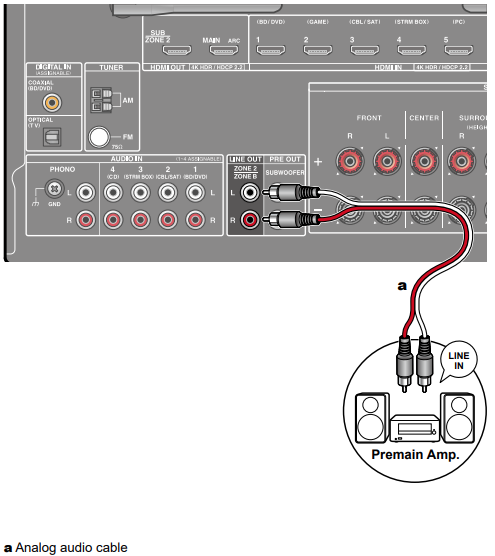
You can enjoy 2-ch audio in the separate room (ZONE 2) while performing playback in the main room (where this unit is located). Use an analog cable to connect the ZONE 2 LINE OUT jack of this unit and the LINE IN jack of the premain amplifier in the separate room. The same source can be played back in the main room and ZONE 2 simultaneously. Also, different sources can be played back in both rooms.
- To output audio from an externally connected AV component to ZONE 2, connect it to any of HDMI IN1 to IN3 jacks. If the AV component is not equipped with an HDMI jack, use a digital coaxial cable, digital optical cable or analog audio cable.
- The audio from externally connected AV components can be output to ZONE 2 only when the audio is analog or 2ch PCM signal.
- When the AV component is connected to this unit with a digital coaxial cable or digital optical cable, change the audio output of the AV component to the PCM output.
Setup
Settings are required to output audio to ZONE 2. Press on the remote controller, and set "2. Speaker" - "Configuration" - "Zone 2 Lineout" to "Zone 2.
Connecting a Pre-main Amplifier, etc. (ZONE B)
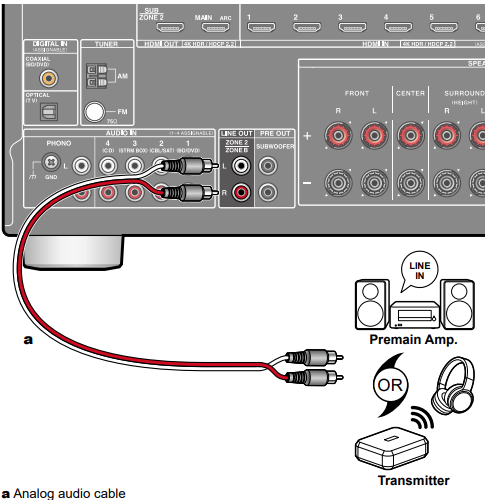
While performing playback through speakers (ZONE A) connected to the unit, you can enjoy the audio of the same source at the same time with the pre-main amplifier or the transmitter of the wireless headphones connected to the ZONE B LINE OUT jack.
- Use an analog audio cable to connect the ZONE B LINE OUT jack of this unit and the LINE IN jack of the pre-main amplifier or the transmitter of the wireless headphones.
- Press the Q button on the remote controller for playback, and select the audio output destination on the Quick menu.
Setup
Settings are required to output audio to ZONE B. Press on the remote controller, and set "2. Speaker" - "Configuration" - "Zone 2 Lineout" to "Zone B".
Comments
0 comments
Please sign in to leave a comment.