TX-NR696 - Zone B Playback
While performing playback in the main room (ZONE A), you can enjoy the audio of the same source in the separate room (ZONE B) at the same time.
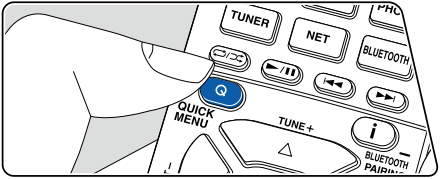
1. Press the Q button on the remote controller and select "Audio" - "Zone B".
- In the following cases, "Zone B" cannot be selected.
– When ZONE 2 is On
– When "2. Speaker" - "Configuration" - "Zone 2 Lineout" on the Setup menu is set to an item other than "Zone B"
2. Select the audio output destination.
- Off: Outputs audio only from ZONE A. "A" on the display of the main unit lights up.
- On(A+B): Outputs audio from both ZONE A and ZONE B. "A"and "B" on the display of the main unit light up.
- On(B): Outputs audio only from ZONE B. "B" on the display of the main unit lights up.
3. Start play on the AV component.
4. Adjust the sound volume on the pre-main amplifier, etc. of ZONE B.
- When "Zone 2 Lineout" is set to "Zone B", and "Audio" - "Zone B" on the Quick Menu is set to "On (A+B)", the ZONE A output is set as below.
– Sound quality cannot be adjusted.
– "2. Speaker" - "Crossover" - "Double Bass" on the Setup menu is fixed to "On".
– The effect for "2. Speaker" - "Distance" on the Setup menu is disabled. - • If "On(A+B)" is selected as an audio output destination, you can select only the "Stereo" listening mode for ZONE A when using the 2.1ch speaker layout.
- When using a speaker layout of 3.1ch or more, you can select only the "AllCh Stereo" listening mode.
Comments
0 comments
Please sign in to leave a comment.