TX-NR6100 - Connecting speakers.
Connections
Speaker Impedance
Connect speakers with an impedance of 4 Ω to 16 Ω. If any of the speakers to be connected has an impedance of 4 Ω or more and less than 6 Ω, set "Speaker Impedance" to "4ohms" for "Speaker Setup" in the Initial Setup section. When setting "Speaker Impedance" from the Setup menu, press on the remote controller, and set "2. Speaker" - "Configuration" - "Speaker Impedance" to "4ohms".
Connect the Speaker Cables
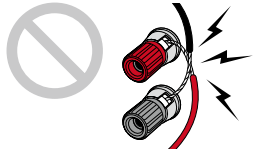
Make correct connection between the unit's jacks and speaker's jacks (+ side to + side, and - side to - side) for each channel. If the connection is wrong, a bass sound will not be reproduced properly due to reverse phase. Twist the wires exposed from the tip of the speaker cable so that the wires do not stick out of the speaker terminal when connecting. If the exposed wires touch the rear panel, or the + side and – side wires touch each other, a malfunction may occur.
3.1 Channel System
3.1 Channel System Bi-Amping the Speakers
Be sure to remove the jumper bar connecting between the woofer jacks and tweeter jacks of the Bi-Amping supported speakers. Refer to the instruction manual of your speakers as well.
5.1 Channel System
5.1 Channel System + Zone B Speaker
5.1 Channel System Bi-Amping the Speakers
Be sure to remove the jumper bar connecting between the woofer jacks and tweeter jacks of the Bi-Amping supported speakers. Refer to the instruction manual of your speakers as well.
7.1 Channel System
3.1.2 Channel System
*1 Connect the Height Speakers you have actually installed (HL/HR: Height Speakers, Top Speakers, Dolby Enabled Speakers).
3.1.2 Channel System + Zone B Speaker
*1 Connect the Height Speakers you have actually installed (HL/HR: Height Speakers, Top Speakers, Dolby Enabled Speakers).
3.1.2 Channel System Bi-Amping the Speakers
Be sure to remove the jumper bar connecting between the woofer jacks and tweeter jacks of the Bi-Amping supported speakers. Refer to the instruction manual of your speakers as well.
*1 Connect the Height Speakers you have actually installed (HL/HR: Height Speakers, Top Speakers, Dolby Enabled Speakers).
5.1.2 Channel System
*1 Connect the Height Speakers you have actually installed (HL/HR: Height Speakers, Top Speakers, Dolby Enabled Speakers).
5.1.2 Channel System + Zone 2 speaker
While ZONE 2 playback is being performed, height speakers installed in the main room cannot play audio.
Comments
2 comments
May I use this receiver along with the four separate amplifiers I currently use to bi-amplify my front main speakers on a 5.1 surround sound configuration?
Thanks, JB
Please sign in to leave a comment.