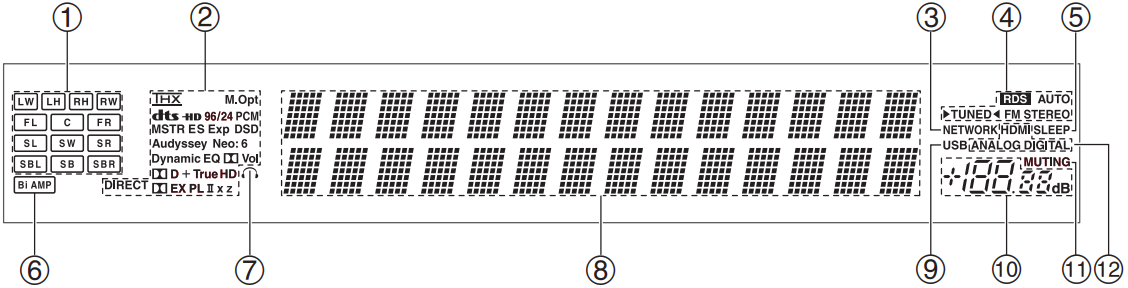
Speaker/Channel Indicators-Indicate the speaker channels used by the current listening mode
The following abbreviations indicate which audio channels are outputted for the current listening mode:
LW: Front wide left LH: Front high left RH: Front high right RW: Front wide right FL: Front left C: Center FR: Front right SL: Surround left SW: Subwoofer (Low Frequency Effects) SR: Surround right SBL: Surround back left SB: Surround back SBR: Surround back right
Listening mode and format indicators-Show the selected listening mode and audio input signal format:
Audyssey: Flashes during Audyssey MultEQ® XT Room Correction and Speaker Setup. Lights when the “Equalizer Settings” is set to “Audyssey” or Audyssey Dynamic Surround Expansion™ listening mode is selected Dynamic EQ: Lights when “Dynamic EQ” is enabled Vol: Lights when “Dynamic Volume” is enabled Dolby Vol: Lights when “Dolby Volume” is enabled
NETWORK indicator: Lights when the Net input selector is selected
Tuning indicators RDS (European models): Lights when tuned to a radio station that supports RDS (Radio Data System). AUTO: Lights when Auto Tuning mode is selected for AM or FM radio. Goes off when Manual Tuning mode is selected TUNED: Lights when tuned to a radio station FM STEREO: Lights when tuned to a stereo FM station
SLEEP indicator: Lights when the Sleep function has been set
Bi AMP indicator: Lights when the “Speakers Type(Front)” setting is set to “Bi-Amp”
Headphone indicator: Lights when a pair of headphones are plugged into the PHONES jack
Message area: Displays various information
USB indicator: Lights up when a USB mass storage device is detected
Volume level: Displays the volume level
MUTING indicator: Flashes while the AV controller is muted
Audio input indicators: Indicate the type of audio input that’s selected as the audio source: HDMI, ANALOG, or DIGITAL
Comments
0 comments
Article is closed for comments.