TX-RZ1100 - Connect the TV
Please use the following instructions to connect your TV to the TX-RZ1100 AV Receiver.
Connection with the TV differs depending on whether the TV supports the ARC (Audio Return Channel) function or not.
- The ARC function transmits the audio signals of the TV via an HDMI cable, and plays the audio of the TV on this unit.
- To check if the TV supports the ARC function, refer to the instruction manual of the TV, etc.
To ARC TV
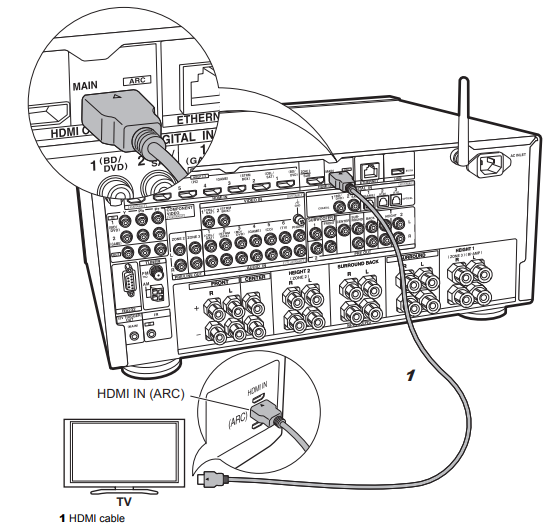
This describes the connections for a TV that supports the ARC (Audio Return Channel) feature. By connecting with a single HDMI cable, you can not only output the video input to this unit to the TV, but you can also play the sound from the TV through this unit. Choose an HDMI IN jack on the TV that supports ARC when connecting.
Setup
Settings are required to use the ARC function.
- Select "Yes" in "5. Audio Return Channel" in the Initial Setup.
- Please refer to the TV's operation manual for directions on connections and setup for the TV.
Another TV or projector can be connected to the HDMI OUT SUB jack.
- Note that this jack is not ARC-compatible.
To Non-ARC TV
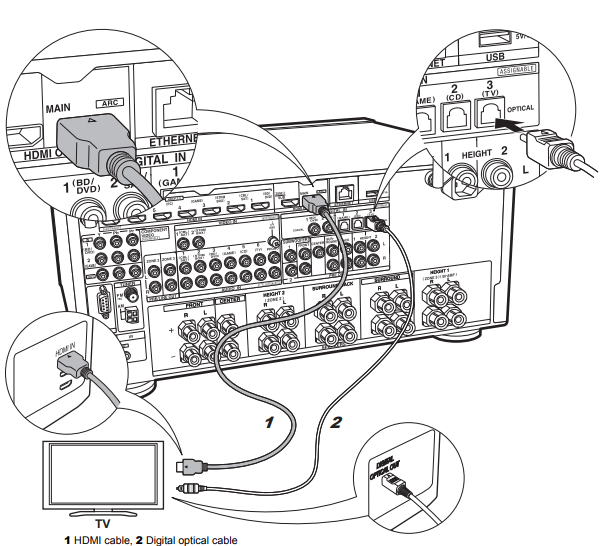
This describes the connections for a TV that does not support the ARC (Audio Return Channel) feature. By connecting with both an HDMI cable and a digital optical cable, you can not only output the video input to this unit to the TV, but you can also play the sound from the TV through this unit.
If the TV doesn't have a DIGITAL OPTICAL OUT jack, use an analog audio cable and connect the TV's ANALOG AUDIO OUT jack to the AUDIO IN TV jack on this unit.
- Connection with a digital optical cable is not necessary if you will watch TV through a device such as a cable set-top box (that is, not use a tuner built into the TV) that you have connected to the INPUT jack on this unit.
Comments
0 comments
Please sign in to leave a comment.