TX-RZ1100 - Connecting an HDMI AV Component
Use the following instructions to connect an AV component to the TX-NR696 AV Receiver using a HDMI cable.

With connection to an AV component that conforms with the CEC (Consumer Electronics Control) standard, you can use features such as the HDMI CEC feature that links with the input selector, and the HDMI Standby Through feature which allows you to play video and audio from AV components on the TV even when this unit is in standby mode.
- To play 4K or 1080p video, use a high speed HDMI cable. Further, to enjoy HDCP2.2 compatible video, connect to the HDMI IN1 to IN5 jacks.
Setup
HDMI setup is required to use the HDMI CEC and HDMI Standby Through features. Make settings after all connections are complete.
- To enjoy digital surround sound including Dolby Digital, audio output should be set to "Bitstream output" on the connected Blu-ray Disc player or other device.
Video Camera Connection
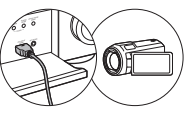
You can connect a device such as a video camera to the AUX INPUT HDMI jack on the front panel.
Comments
0 comments
Please sign in to leave a comment.