TX-RZ1100 - Multi-Zone Connection
Please use the following instructions for multi-zone connections with the TX-RZ1100 AV Receiver.
Zone 2 TV
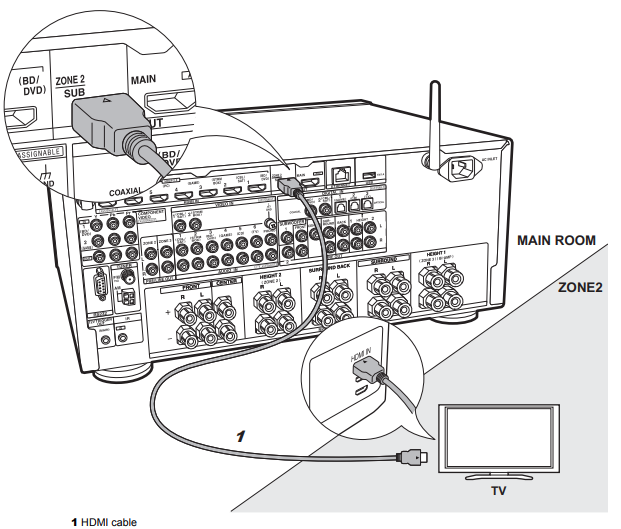
You can enjoy content from a Blu-ray Disc player on a TV equipped with an HDMI input jack in the separate room (ZONE 2) by playing a Blu-ray Disc player in the main room (where this unit is located), or play the content from another AV component. Only the video from devices connected to the HDMI IN1 to IN5 jacks can be played on the TV in the separate room.
Setup
Settings are required in Initial Setup, "4. Multi Zone Setup" to enjoy this feature.
- The audio from externally connected AV components can only be played in ZONE 2 when the audio is analog or 2ch PCM audio. It may also be necessary to convert the audio output of the AV component to PCM output.
ZONE 2 PRE/LINE OUT / ZONE 2 SPEAKER
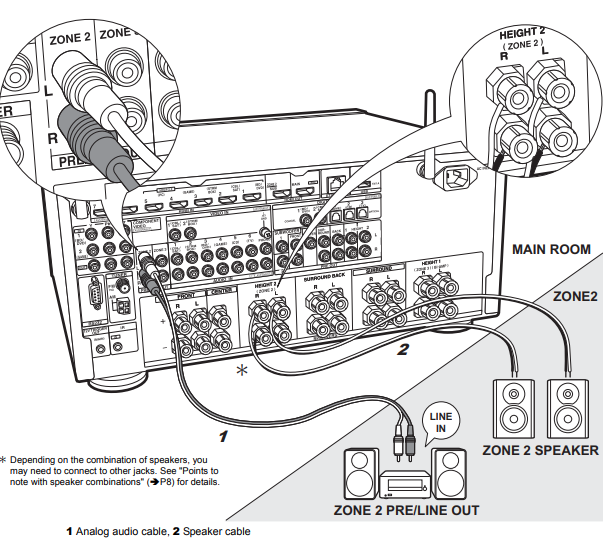
You can enjoy audio in the separate room by, for example, playing a Blu-ray Disc player in the main room (where this unit is located) and listening to internet radio in the separate room (ZONE 2).
Setup
Settings are required in Initial Setup, "4. Multi Zone Setup" to enjoy this feature.
- The audio from externally connected AV components can only be played in ZONE 2 when the
audio is analog or 2ch PCM audio. If you have connected to this unit with an HDMI cable or digital optical/coaxial cable, may be necessary to convert the audio output of the AV component to PCM output.
Connections with an AV component
Connect with HDMI IN 1 to 5 if you want to output an external AV component to ZONE 2.
- If the AV component doesn't have an HDMI jack, connect using a digital optical cable, digital coaxial cable, or analog audio cable.
ZONE 2 PRE/LINE OUT
It is possible to play 2 ch sources in a separate room while sources with a maximum of 11.1 ch are being played in the main room.
- Connect the ZONE 2 PRE/LINE OUT jacks of the unit and the LINE IN jacks of the pre-main amplifier or the power amplifier in a separate room with an analog audio cable.
ZONE 2 SPEAKER
It is possible to connect speakers in a separate room and play 2 ch sources.
- You can play through a maximum of 7.1 channels in the main room during ZONE 2 playback. With Bi-Amping connection or while ZONE 3 speaker connection settings are enabled, no sound is heard from the surround back speakers or height speakers and a maximum of 5.1 channel playback is possible in the main room.
- Listening modes such as Dolby Atmos cannot be selected.
ZONE 3 PRE/LINE OUT / ZONE 3 SPEAKER
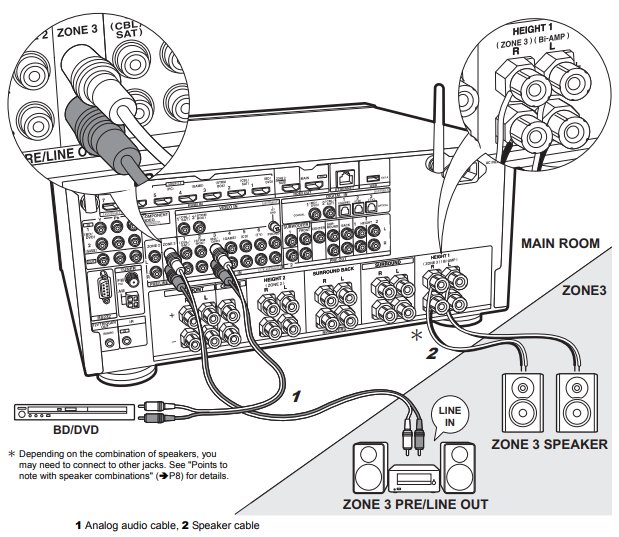
Along with the main room and ZONE 2, you can also enjoy audio in yet another room (ZONE 3).
Setup
Settings are required in Initial Setup, "4. Multi Zone Setup" (P22) to enjoy this feature.
Connections with an AV component
To output the audio of an external AV component to ZONE 3, connect using an analog audio cable.
- Output to ZONE 3 is not possible when you connect with an HDMI cable or digital optical/coaxial cable.
ZONE 3 PRE/LINE OUT
It is possible to play 2 ch sources in a separate room while sources with a maximum of 11.1 ch are being played in the main room.
- Connect the ZONE 3 PRE/LINE OUT jacks of the unit and the LINE IN jacks of the pre-main amplifier or the power amplifier in a separate room with an analog audio cable.
ZONE 3 SPEAKER
It is possible to connect speakers in a separate room and play 2 ch sources.
- During ZONE 3 playback, no sound is heard from the surround back speakers or the height speakers and a maximum of 5.1 channel playback is possible in the main room.
- Listening modes such as the Dolby Atmos modes cannot be selected.
Comments
0 comments
Please sign in to leave a comment.