TX-RZ1100 - Front Panel
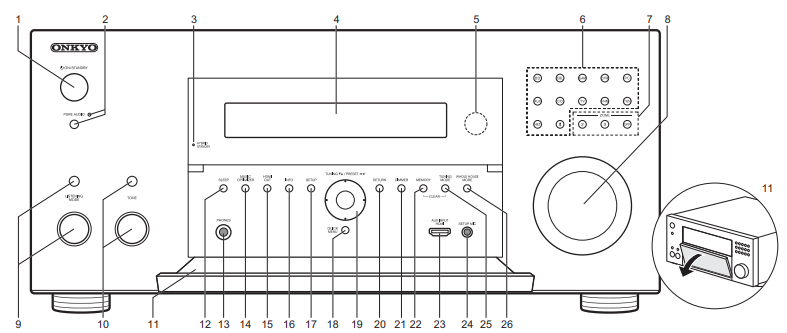
1. ON/STANDBY Button: Turns the unit on or into standby mode.
2. PURE AUDIO Button/Indicator: Switches the unit to Pure Audio mode.
3. HYBRID STANDBY Indicator: Lights if the unit enters standby mode when the features are enabled that continue to work when this unit is in standby, such as HDMI Standby Through and Network Standby.
4. Display
5. Remote Control Sensor
6. Input selector Buttons: Press the following buttons to switch the input to be played. The jack allocated to the buttons at the time of purchase are shown inside the parentheses ( ).
BD (BD/DVD)
CBL (CBL/SAT)
GAM (GAME)
STM (STRM BOX)
PC (PC)
AUX (AUX INPUT HDMI)
CD (CD)
TV (TV)
PHN (PHONO)
TUN: AM/FM Radio
NET: Playing the Internet Radio, USB, etc.
Bluetooth Symbol: BLUETOOTH function
7. ZONE 2/ZONE 3 Buttons: Controls the multi-zone function. OFF button: Switches the multi-zone function off.
8. MASTER VOLUME: Allows you to adjust the volume.
9. (Up) LISTENING MODE Button / (Down) LISTENING MODE Dial: Allows you to select the listening mode.
- Press the button repeatedly to select a category from "Movie/TV", "Music", "Game", then turn the dial to change the mode.
10. (Up) TONE button / (Down) TONE Dial: Adjusts the high tone and low tone.
- Press the button repeatedly to select the item to adjust from "Bass" and "Treble", and turn the dial to adjust.
11. Front flap
12. SLEEP Button: Set the sleep timer. Select from "30 minutes", "60 minutes", and "90 minutes".
13. PHONES Jack: Stereo headphones with a standard plug (1/4 inch or ø6.3 mm) are connected.
14. MUSIC OPTIMIZER Button: Turns on/off the Music Optimizer function that provides better sound quality for compressed audio.
15. HDMI OUT Button: Allows you to select the HDMI OUT jack to output video signals from "MAIN", "SUB", and "MAIN+SUB".
16. INFO Button: Switches the information on the display.
17. SETUP Button: Displays the Setup menu.
18. QUICK MENU Button: You can perform common settings on the TV screen.
19. Cursor buttons (TUNING4 3 / PRESET2 1 button) and ENTER Button: Select the item with the cursors and press ENTER to confirm your selection.
- When using the TUNER, select the frequency with TUNING4 3, or select preset stations with PRESET2 1.
20. RETURN Button: Returns the display to the previous state.
21. DIMMER Button: You can adjust the brightness of the display in three steps.
- It cannot be turned off completely.
22. MEMORY Button: Used to register AM/FM radio stations.
23. AUX INPUT HDMI Jack: Connect to a video camera, etc., using a HDMI cable.
24. SETUP MIC Jack: The supplied speaker setup microphone is connected.
25. TUNING MODE Button: Switches the tuning mode.
26. WHOLE HOUSE MODE Button: Enables the WHOLE HOUSE MODE function to play the same source in all the multi-zone connected rooms.
Comments
0 comments
Please sign in to leave a comment.