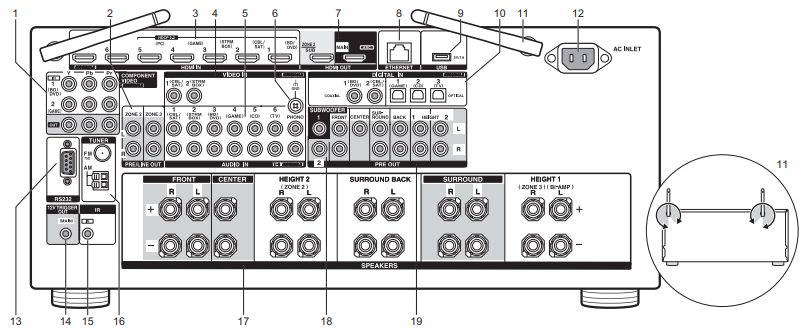
COMPONENT VIDEO IN/OUT Jacks: Transfer the video signals of an AV component with a component video cable.
ZONE 2/ZONE 3 PRE/LINE OUT Jacks: Output audio signals with an analog audio cable to a pre-main amplifier or a power amplifier in a separate room (ZONE 2/ZONE 3).
HDMI IN Jacks: Transmit video signals and audio signals with a HDMI cable connected to an AV component.
VIDEO IN Jacks: Input the video signals from AV components with an analog video cable.
AUDIO IN Jacks: Input TV or AV component audio signals with an analog audio cable.
GND Terminal: The ground wire of the turntable is connected.
HDMI OUT Jacks: Transmit video signals and audio signals with a HDMI cable connected to a monitor such as a TV or projector.
ETHERNET Port: Connect to the network with an Ethernet cable.
USB Port: A USB storage device is connected so that music files stored in it can be played.
You can also supply power (maximum 5V/1A) to USB devices with a USB cable.
DIGITAL IN OPTICAL/COAXIAL Jacks: Input the digital audio signals from TV or AV components with a digital optical cable or digital coaxial cable.
Wireless Antenna: Used upright for Wi-Fi connection or when using a BLUETOOTH enabled device. The diagram shows the movable range for the wireless antenna.
Do not try to force it beyond this range otherwise you may break it.
AC INLET: The supplied power cord is connected.
RS232 Port: For connection to the home control system.
12V TRIGGER OUT Jacks: Allows you to connect a device with 12V trigger input jack to enable link operation between the device and the unit.
IR IN Port: Allows you to connect a multiroom remote control kit.
TUNER AM/FM 75Ω Terminal: The supplied antennas are connected.
SPEAKERS Terminals: Connect speakers with speaker cables. (North American models are compatible with banana plugs.)
SUBWOOFER PRE OUT Jacks: Connect a powered subwoofer with a subwoofer cable.
Up to two powered subwoofers can be connected.
You can set the volume levels of the 2 powered subwoofers to different levels.
Comments
0 comments
Please sign in to leave a comment.