TX-RZ1100 - Display
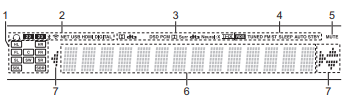
1. Speaker/Channel display: Displays the output channel that corresponds to the selected listening mode.
2. Lights in the following conditions.
HEADSET ICON: When headphones are connected.
Z2/Z3: When ZONE 2/ZONE 3 is on.
BLUETOOTH ICON: When connected by BLUETOOTH.
WIFI ICON: When connected by Wi-Fi.
NET: When "NET" is selected with the input selector and the unit is connected to the network.
- It will flash if the connection to the network is not correct.
USB: When "NET" is selected with the input selector and the unit is connected by USB and the USB device is selected.
- Flashes if the USB is not properly connected.
HDMI: When HDMI signals are input and the HDMI input is selected.
DIGITAL: When digital signals are input and the digital input is selected.
3. Lights according to the type of input digital audio signals and the listening mode.
4. Lights in the following conditions.
RDS (European and Asian models): Receiving RDS broadcasting.
TUNED: Receiving AM/FM radio.
FM ST: Receiving FM stereo.
SLEEP: When the sleep timer is set.
AUTO STBY: When Auto Standby function is enabled.
5. Flashes when muting is on.
6. Displays various information of the input signals. Characters that cannot be displayed on this unit are replaced with asterisks ( * ).
- When playing back software which has been encoded in Dolby Digital,
Dolby Digital Plus, Dolby TrueHD and Dolby Atmos, sometimes you may
see a brief message which will read "DialogNorm: X dB" (X being a
numeric value). For example, if you see the following message:
"DialogNorm:+4dB", to keep the overall output level at THX calibrated
loudness, just turn down the volume control by 4dB.
7. Lights when operating the "NET" input selector indicating remote controller cursor operations are possible in screens showing list of tracks, for example.
Comments
0 comments
Please sign in to leave a comment.