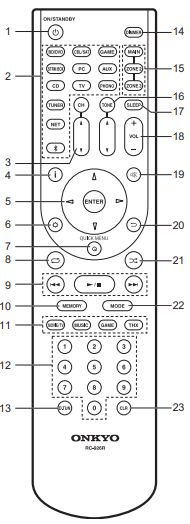
ON/STANDBY Button: Turns the unit on or into standby mode.
Input selector Buttons: Switches the input to be played.
CH ^ / v Buttons: Adjust the volume level of the speaker. Press CH several times to select the speakers, then press ^ / v to adjust the level.
"i" Button: Switches the information on the display.
Cursor Buttons and ENTER Button: Select the item with the cursors and press ENTER to confirm your selection.
SETTING Button: Displays the Setup menu.
Q (QUICK MENU) Button: You can perform common settings on the TV screen.
Repeat Play Button: You can start repeat play of the Music Server or USB.
Play Buttons: You can start play of the Music Server or USB.
MEMORY Button: Used to register AM/FM radio stations.
LISTENING MODE Buttons: Allows you to select the listening mode.
Numbered Buttons
D.TUN Button: Use to directly input the frequency of AM/FM stations when tuning.
DIMMER Button: You can adjust the brightness of the display in three steps.
It cannot be turned off completely.
MAIN/ZONE 2/ZONE 3 Buttons: Controls the multi-zone function.
TONE Buttons: Adjusts the treble and bass. Press TONE several times to select the item you want to adjust from "Bass" and "Treble", then press the cursors to adjust the level.
SLEEP Button: Set the sleep timer. Select from "30 minutes", "60 minutes", and "90 minutes".
Volume Buttons: Allows you to adjust the volume. This button also cancels the muting.
MUTE Button: Temporarily mutes audio. Press again to cancel muting.
BACK Button: Returns the display to the previous state.
SHUFFLE Button: You can start random play of the Music Server or USB.
MODE Button: Switches tuning to an AM/FM station between automatic tuning and manual tuning.
CLR Button: Deletes all characters you have entered when entering text on the TV screen.
Comments
0 comments
Please sign in to leave a comment.