TX-RZ1100 - ARC and HDMI Setup
Please use the following instructions to set up ARC function and HDMI settings on the TX-RZ1100 AV Receiver.
If you have connected a TV that supports ARC, select "Yes". This unit's ARC setting turns on and you can listen to the TV's audio through this unit.
- If you select "Yes", the HDMI CEC function is enabled and power consumption increases during standby
HDMI CEC
Make this setting to enable the control feature for devices complying with the CEC standard.
This is set to on automatically if you have selected "Yes" in "5. Audio Return Channel" in the Initial Setup.
Press the button on the remote controller to set "5. Hardware" – "HDMI" – "HDMI CEC" to "On" on the TV
screen.
- Also enable the CEC control feature on the CEC device you have connected.
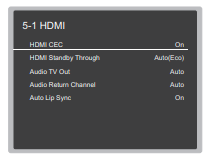
HDMI Standby Through
Even if this unit is in standby, the input signals from AV components are transmitted to the TV.
"Auto" / "Auto (Eco)": Select one of these settings when connected AV components comply with the CEC standard. Irrespective of the input selector selected immediately before switching the unit to standby, you can transmit the input signals from AV components to the TV.
- Select "Auto (Eco)" if the TV is also CEC-compliant. You can reduce power consumption in standby mode.
Input selector names for "BD/DVD", etc.: You can transmit the input signals from the set input selector to the TV.
- It can be selected when "HDMI CEC" is set to "Off".
"Last": You can transfer the input signals of the input selector selected immediately prior to the unit being switched to standby.
- It can be selected when "HDMI CEC" is set to "Off". With this setting, you can switch the input selector even in the standby mode.
To exit the settings, press [SETTING].
Comments
0 comments
Please sign in to leave a comment.